If you’re exploring options for an AI chatbot for website, the goal isn’t just automation it’s delivering help that feels human, smart, and seamless. The right AI chatbot platform should bring automation without friction. Let’s break down what truly matters so you can evaluate options confidently.
Why Getting This Right Matters for Your Business
- Instant answers drive satisfaction. Visitors expect quick, accurate responses chatbots handle that 24/7 and reduce wait times significantly.
- Efficiency saves cost. Simple FAQ automation can reduce support tickets by up to 30–40% saving time and resources. (seosandwitch.com, ecommercebonsai.com)
- Conversion improves with context. Smart bots capture leads early some businesses report up to 70% uplift in qualified leads when using targeted AI chat prompts. (createandgrow.com)
- Agents do better work. Automating common queries lets human teams focus on tricky issues sending morale and performance up.
- Trust scales with transparency. When bots are clear, visible, and can pass control back to humans, users adopt faster and stick.
Pro tip: Start with a high-impact use case think billing or pricing FAQs and expand from there to prove ROI quickly.
What to Expect from Your AI Chatbot Software
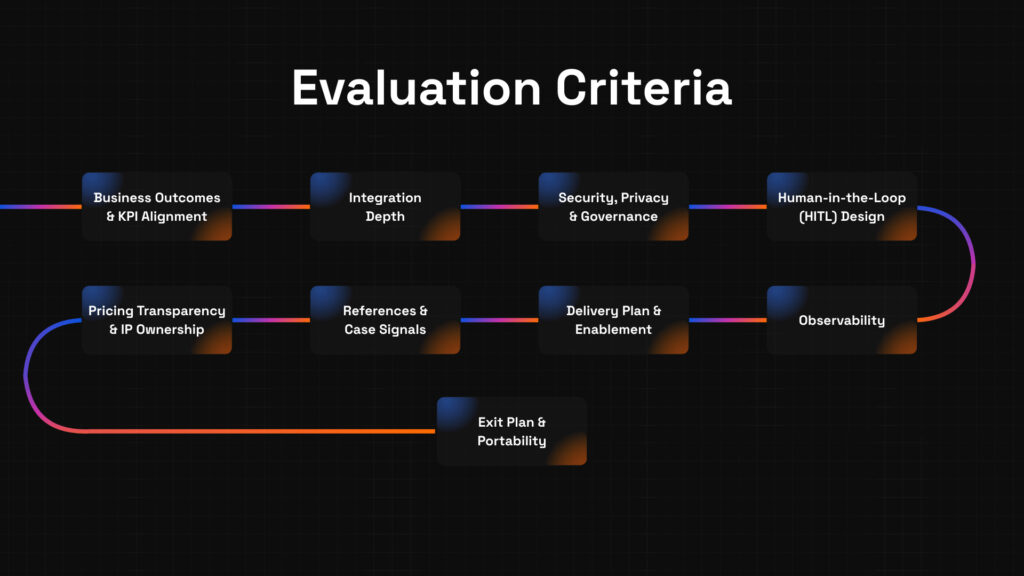
Here’s your vendor-neutral checklist to assess any AI chatbot software:
- Business outcomes & KPI focus
The vendor should ask, “What problem are you solving?” Not “Here’s what our chatbot can do.” Your priorities like reducing chat volume by 40% should guide evaluation. - Integration depth
The chatbot must integrate with your CMS, CRM, support desk, and analytics tools to pull and push data seamlessly without manual handoffs. - Security, privacy, and compliance
Look for data handling policy, encryption, GDPR/CCPA support, and audit logs. If your site handles sensitive info, these are non-negotiable. - Human-in-the-loop (HITL) features
Bots should escalate ambiguous or complex requests to humans automated but supervised workflows build safety and trust. - Observability (dashboards, logs, rollback)
You need transparency not mystery. If AI misbehaves, you should see why and revert if needed. - Delivery & enablement
The vendor shouldn’t leave education to chance. You need training guides, handovers, and internal support to keep things running. - References & methodology
Ask for real outcomes not marketing slides. Case studies with measured results (e.g., “reduced first contact time by 25% in 60 days”) are gold. - Pricing transparency & IP ownership
Use-case pricing models with clear thresholds help avoid surprises. Confirm who owns chat scripts, AI logic, and customization. - Exit plan & portability
You should be able to export your flows and data if you ever switch platforms. Portability is planning for future flexibility.
Example Use Case
A mid‑stage SaaS company implemented an AI chatbot platform tied into their CRM and help desk. The bot handled top 20 FAQ queries and passed lookup failures to support agents. Results in 8 weeks:
- 40% drop in support volume
- 20% boost in lead generation via chat
- Agents reported higher satisfaction handling fewer repetitive questions.
Common Pitfalls and Smart Fixes
- Trap: Choosing the flashiest interface → Fix: Evaluate based on data integration, not just UI.
- Trap: Treating chatbots as FAQ replacements only → Fix: Build proactive logic like lead forms and smart routing.
- Trap: Skipping human fallback → Fix: Always route ambiguous queries to agents.
- Trap: No live metrics → Fix: Demand dashboards and error reports from the start.
- Trap: No training included → Fix: Ensure documentation and team onboarding are part of the deal.
- Trap: Vendor-centric content ownership → Fix: Clarify IP and exporting rights up front.
- Trap: Surprises in pricing → Fix: Get clear rate cards and usage assumptions early.
Five-Step Evaluation Framework for AI Chatbot Selection
- Define KPI & scope
- Example: “Automate billing FAQs with <5% fallback to agents within 60 days.”
- Pro tip: Begin with a narrow use case, show value before scaling.
- Shortlist with a scorecard
- Rate vendors across integration, HITL, visibility, enablement, and outcomes.
- Collaborate with tech, ops, and support stakeholders for validation.
- Discovery + platform audit
- Walk your tech stack with shortlisted vendors and flag integration gaps early.
- Pilot with HITL & dashboards
- Roll out on a key topic, track performance, PII handling, and escalation paths.
- Decide, scale, and review quarterly
- Scale to new flows once KPIs hit, review performance and train staff quarterly.
Vendor Questions You Can Copy/Paste
- How does your chatbot integrate with CMS, CRM, support, and analytics tools?
- What policies govern data security and compliance?
- How does HITL handoff work for low-confidence interactions?
- What observability tools are built in, can I see logs, rollbacks, and dashboards?
- What enablement materials do you provide during rollout and post-launch?
- Who retains ownership of our chat logic, prompts, and configurations?
- What does portability look like if we switch platforms?
Quick Templates
Email Snippet
Hi [Vendor],
We’re exploring an AI chatbot for website to automate help flows and drive leads. Could you share how your platform connects to CRM/support systems, handles governance, supports HITL fallback, and equips our team alongside exportability and pricing transparency?
Thanks,
[Your Name]
Scorecard Example
| Criteria | Weight | Vendor A | Vendor B |
| Integration Depth | 25% | ||
| HITL Support | 20% | ||
| Observability | 15% | ||
| KPI Outcomes | 20% | ||
| Enablement & Handover | 10% | ||
| Security & Compliance | 5% | ||
| Portability | 5% |
Pilots, Evaluation & Smart Scaling of Your AI Chatbot for Website
Now you’ve laid the groundwork. Time to test a real chatbot workflow, measure impact, and know when and how to grow. This section maps out a pilot-first path with scoring, monitoring, and governance baked in.
Why Pilots Matter More Than Demos
- Demos entertain pilots prove value. Live testing with part of your traffic turns vague promises into real outcomes.
- AI can trip up on edge cases. With human-in-the-loop (HITL), you catch quirks before damage spreads. Databricks’ CEO highlights that AI still requires human oversight like pilots in aviation to manage complexity safely. (turn0news14)
- Real dashboards, logs, and fail-safe rollbacks keep your team in control. That visibility is trust.
- Stat: Automated chat solutions that enabled context-aware handoffs boosted agent productivity and reduced escalation rates. Brynjolfsson et al. report 15% productivity gains when AI agents assist support staff. (turn0academia20)
Step-by-Step: Pilot Blueprint
- Define KPI & Narrow Scope
Example: “Reduce FAQ support tickets by 40% in 60 days, maintain CSAT >80%.”
Pro tip: Pick one topic like password resets or pricing FAQs to keep learnings clear and wins fast. - Build and Use a Scorecard
Your evaluation matrix should include:- KPI impact (did tickets drop?)
- Integration quality
- HITL fallback
- Observability setup
- Enablement & handover
- Governance & data handling
Assign weights, evaluate during pilot, and include operations, security, and support perspective.
- Run Pre-Pilot Discovery
Walk through your site, CMS, support stack, and analytics with vendors. Surface technical or policy gaps early especially around PII or audit flows. - Launch Pilot with HITL & Monitoring
Set up dashboards to monitor resolution rates, fallback frequency, intent mismatches, and user satisfaction. - Review Weekly, Scale Smartly
Meet weekly for 1–2 months. If KPIs hit thresholds reduce agent time, higher self-service, steady CSAT then expand to additional topics. Keep quarterly reviews as automation evolves.
Watch for These Pilot Pitfalls and Fixes
- Trap: Testing only outside traffic. → Fix: Include live users to see real behavior.
- Trap: No human fallback. → Fix: Make HITL mandatory for low-confidence interactions.
- Trap: No visibility. → Fix: Ensure dashboards and logs are live day one.
- Trap: No enablement. → Fix: Build internal training during pilot scope.
- Trap: Ignoring governance. → Fix: Involve security teams early in rollout.
Example Success Snapshot
A mid-market telecom pilot tested chatbot for order tracking and billing FAQs, with HITL for tricky queries. In a month:
- FAQ tickets dropped 35%
- CSAT stayed above 85%
- Agents handled 25% more complex tickets per shift
- System logs flagged misunderstood intents, guiding improvements
This pilot paved the way to expand to product recommendation flows without breaking trust.
Why Human Oversight Still Matters
Not everything AI gets right especially when tasks get complex. In fact, many professionals still say they trust human networks more than AI alone about 64% of them. (turn0news13)
AI chatbots should assist, not replace people. Hybrid AI for the simple, humans for the complex are where reliability and efficiency meet.
Scaling with Confidence (Next Steps)
After pilot success:
- Expand chatbot to more use cases (e.g., lead capture, onboarding).
- Improve governance, add periodic checkpoint audits.
- Update training and internal playbooks with pilot learnings.
- Rotate your oversight team to keep context fresh and continually refine prompts and intents.
What to Ask Your Vendor Now
- How do you support live rollout metrics fallback frequency, intent precision, user sentiment?
- Can we connect to support analytics and CRM systems, with logging?
- What human handoff workflows come standard, and can we customize rules?
- How do you ensure data security during pilot scale?
- How do you work with teams’ post-pilot handovers, training, and documentation?
Final Vendor Vetting, Internal Alignment, and Your Next Step
Now that your chatbot pilot has validated the concept, it’s time to make a thoughtful decision. This final section equips you with critical vendor questions, reusable templates, a quick sanity-check rubric, and a path-forward strategy that feels grounded and human.
Final Internal Checklist Before Choosing
Let’s make sure nothing slips through the cracks:
- Pilot reached your KPI goals (e.g., 40% ticket reduction).
- Integration connections (CMS, CRM, help desk, analytics) are validated.
- Human-in-the-loop (HITL) escalation works reliably.
- Observability tools dashboards, logs, rollback are live.
- Team training and internal documentation are complete.
- Security and data governance are signed off.
- Ownership and portability of chatbot logic are explicit.
- Pricing model and cost assumptions are clear.
- There’s a thoughtful, approved exit or migration plan if needed.
If any item above is a “no,” it’s worth delaying signing or bringing it into your kickoff conversation.
Smart Questions to Ask Finalist Vendors
Use these copy‑paste prompts in your final vendor discussions:
- What measurable outcomes have you achieved in similar use cases (e.g., support volume reduced, lead capture improved)?
- How does your HITL design work especially for ambiguous or low-confidence queries?
- Which systems do you integrate with (CMS, CRM, help desk, analytics), and how deep is the integration?
- What governance features are built-in like audit logs, PII mask, and data retention policy?
- What observability tools are included dashboards, alerting, rollback?
- How do you ensure long-term enablement training, playbooks, ongoing handover?
- How are cost escalations managed if usage scales or during promotional spikes?
- Who owns the chatbot workflows, prompts, and configuration?
- Can the assets be exported if we decide to switch platforms?
Pro tip: Bring operations, support, and IT/security legislators into one session. Their alignment matters most.
Reusable Templates
RFP Brief to Align Stakeholders
Subject: Internal Prep: AI Chatbot for Website RFP
Hey Team,
We’re preparing to send an RFP for a new AI chatbot for website focused on automating FAQs, scaling lead capture, and ensuring oversight via HITL.
Key areas:
- Proven KPI outcomes
- CMS/CRM/analytics integration
- Human fallback logic
- governance and visibility
- Training and portability
I’ll schedule a 30-minute alignment call this week with ops, security, and support.
Thanks,
[Your Name]
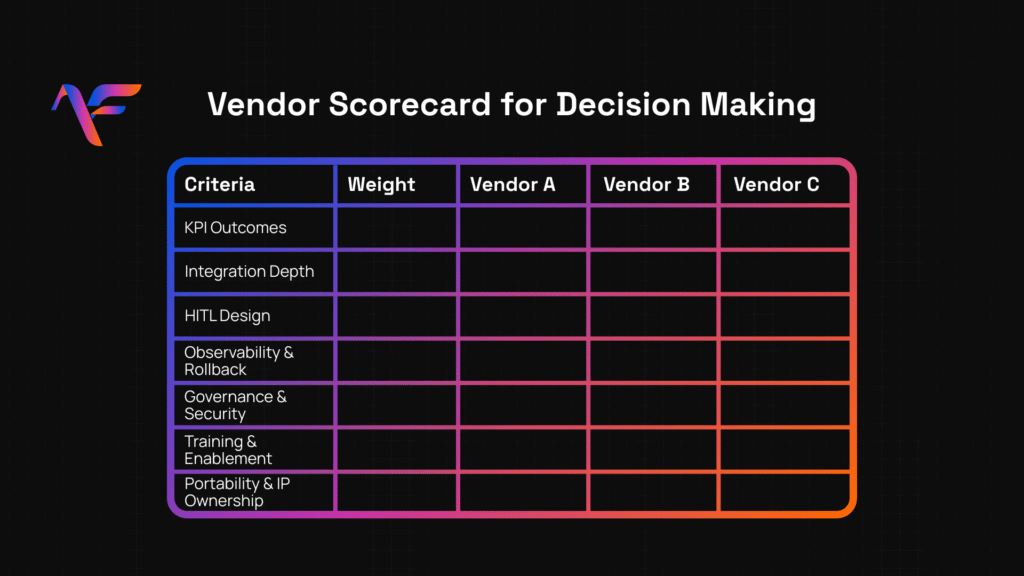
Vendor Scoring Rubric Snapshot
| Criteria | Weight | Vendor A | Vendor B | Notes |
| KPI Outcomes | 25% | |||
| Integration Depth | 20% | |||
| HITL Design | 15% | |||
| Observability & Rollback | 15% | |||
| Governance & Security | 10% | |||
| Training & Enablement | 10% | |||
| Portability & IP Ownership | 5% |
Red Flags to Avoid (Trust Your Instinct)
Here’s what to watch for:
- Opposition from your security or IT team skip that vendor.
- Vague answers to “Who owns the logic?” you may lose control later.
- No rollback or HITL your bot breaks silently.
- No live metrics how can you govern what you can’t see?
- No plans for enablement maintenance will stall.
- Hype over KPI results demos don’t scale.
Key Takeaways and Friendly Final Thought
Choosing the right AI chatbot platform is about building equity, not novelty. It’s about trust, transparency, and long‑term capability not just ticking boxes or chasing tools. Until your people feel confident handling the bot, automation hasn’t done its job.
With your pilot proving success and scoring aligned across teams, you’re in prime position to scale. If you’d like guidance mapping from pilot to full rollout with strategy, governance, and internal alignment book a free strategy call today. We’ll make sure your automation fits your metrics, stack, and people.