
Why AI Automation in Recruitment Matters and What to Look For
Hiring is one of the most time-consuming and challenging parts of running a business. Screening hundreds of resumes, coordinating interviews, and keeping candidates engaged can easily overwhelm HR teams. That’s where AI automation in recruitment comes in — helping companies speed up hiring, reduce manual work, and improve the quality of candidates without adding complexity.
But the buzz around AI can also be confusing. Not every tool delivers on its promises, and it’s easy to fall into traps that hurt rather than help your hiring process. To get it right, you need to understand what good recruitment automation looks like, how ATS automation fits in, and why connecting your systems to a talent CRM matters.
This first section breaks down why AI automation matters for recruitment today, what core capabilities to expect, and practical tips for evaluating tools in a vendor-neutral way.
Why AI Automation in Recruitment Matters Now
- Saves recruiter time: Automating repetitive tasks like resume screening and interview scheduling can free up 30-40% of recruiters’ time. That’s time they can spend on strategic activities like building relationships with candidates or refining job requirements.
- Speeds up hiring: Automated resume parsing and candidate ranking help cut down time-to-hire from weeks to days. In competitive job markets, a faster process can mean landing top talent before someone else does.
- Improves candidate quality: AI models trained on historical hiring data can identify candidates who might be missed by simple keyword filters — helping you find better fits and increase workforce diversity.
- Enhances candidate experience: Automated communication like interview reminders, chatbot Q&A, and timely feedback keep candidates engaged and reduce no-shows or dropouts.
- Becomes a baseline expectation: Studies show 80-90% of recruiters are already using some form of automation or AI to streamline parts of their workflow. This isn’t a luxury anymore; it’s becoming standard practice. (DemandSage, 2025)
What Does Recruitment Automation Include?
Understanding the components of AI automation helps you spot real value and avoid hype.
- ATS Automation: Your Applicant Tracking System is often the heart of recruitment tech. Automation here means resume parsing, automated candidate scoring, triggering candidate stage transitions, and sending status updates automatically.
- Talent CRM Integration: Your talent CRM manages relationships with candidates beyond the active hiring process — nurturing passive candidates, storing historical data, and managing outreach campaigns. Automation should sync this data seamlessly.
- Candidate Screening: AI-powered tools analyze resumes, video interviews, or skills tests, scoring candidates based on relevant criteria. This reduces manual screening hours and can flag hidden gems.
- Scheduling & Communication: Chatbots and automated schedulers can handle interview bookings, reminders, and routine questions — keeping candidates informed without burdening recruiters.
How to Evaluate AI Automation in Recruitment Vendors
Picking the right AI automation partner is more than a feature checklist. Look for these critical areas:
1. Business Outcomes & KPI Alignment
- Define your hiring goals upfront — whether it’s reducing time-to-hire, improving diversity, or lowering cost-per-hire.
- Can the vendor demonstrate how their AI automation improves those metrics?
- Make sure measurable KPIs are part of the evaluation and contract.
Pro tip: Don’t buy automation without clarity on the business impact. Vague promises are red flags.
2. Integration Depth with ATS and Talent CRM
- How tightly does the tool integrate with your current ATS and talent CRM?
- Does it allow for real-time read and write operations? For example, can it automatically move candidates between stages or update profile fields?
- Check if it supports your existing tech stack or requires costly rip-and-replace.
Example: A tool that can pull candidate data from your ATS, analyze it with AI, then update the system and trigger messages saves manual work and reduces errors.
3. Security, Privacy, and Compliance
- Candidate data is sensitive. Confirm that vendors comply with laws like GDPR, CCPA, or others relevant to your region.
- Ask about data encryption, access controls, and audit capabilities.
- Understand who owns the data — can you export it if you switch providers?
Pro tip: Transparency and strong governance policies reduce risks of costly data breaches or compliance violations.
4. Human-in-the-Loop (HITL) and Escalation Mechanisms
- AI should support recruiters, not replace them.
- Does the system allow human reviewers to override AI decisions or flag candidates for further review?
- Ensure the tool has clear escalation paths to handle uncertain or borderline cases.
This approach balances efficiency with fairness and reduces risks from automation errors.
5. Observability and Monitoring
- Can you track how the AI is performing? Look for dashboards showing model accuracy, candidate funnel metrics, and error rates.
- Is there an option to roll back changes or tune the AI quickly if issues arise?
Good observability builds trust and helps you continuously improve the system.
6. Delivery Plan and Enablement
- Will the vendor provide training, documentation, and support for your team?
- Smooth onboarding helps adoption and minimizes disruption.
- Check if there are playbooks or resources for customizing workflows or scaling automation.
Common Pitfalls and How to Avoid Them
- Trap: Automating too much too fast.
Fix: Start with high-impact workflows like resume screening or interview scheduling before expanding. - Trap: Neglecting candidate experience.
Fix: Use automation to keep candidates informed and engaged with timely updates and easy scheduling. - Trap: Blindly trusting AI decisions.
Fix: Insist on human review capabilities and regular fairness audits. - Trap: Poor integration causing data silos.
Fix: Verify integration depth early and test API workflows. - Trap: Underestimating training needs.
Fix: Invest time in onboarding and team enablement. - Trap: Vendor lock-in through proprietary data formats.
Fix: Ensure data portability and clear exit terms.
Detailed Evaluation Criteria and Avoiding Common Pitfalls
In the last section, we explored why AI automation in recruitment matters and the core capabilities to expect. Now, let’s dive deeper into practical evaluation criteria to compare vendors, spot red flags, and set yourself up for success. We’ll also highlight common pitfalls recruiters and operations leaders face — along with straightforward fixes.
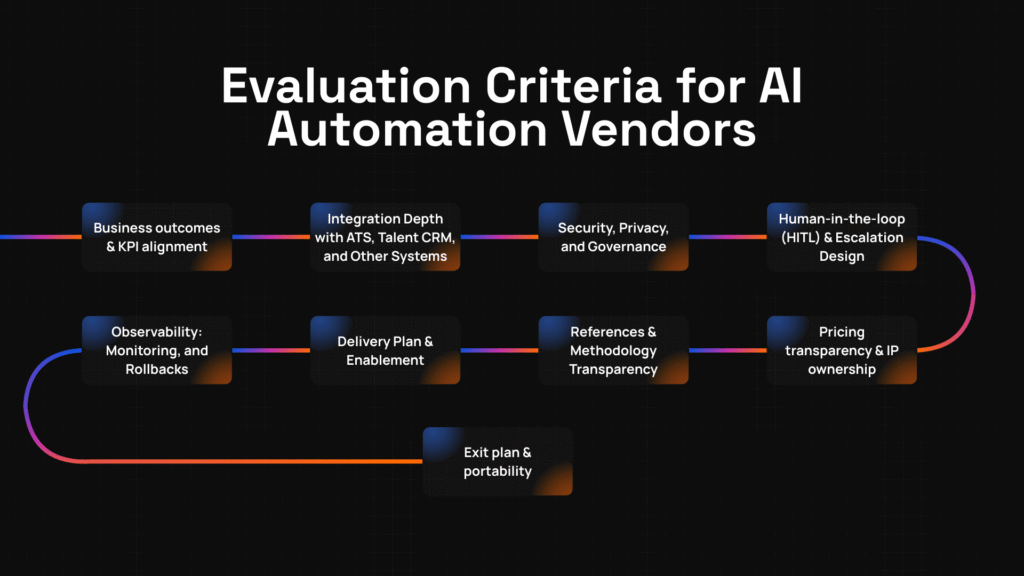
Detailed Evaluation Criteria for AI Automation Vendors
Choosing the right AI automation partner isn’t just about shiny features. Here’s a checklist to guide your vendor evaluation, focusing on practical business and technical considerations.
1. Business Outcomes & KPI Alignment
- Start with your hiring goals. Are you aiming to shorten time-to-fill? Improve diversity? Reduce recruiter workload? Cut cost-per-hire?
- Ask vendors how their AI automation impacts these specific KPIs. Can they show case studies or data supporting claims?
- Look for vendors that commit to transparent measurement and share insights via dashboards or reports.
- Confirm that the solution supports continuous optimization — AI models should adapt over time as your hiring needs evolve.
Example: A company focused on diversity might want an AI system that flags unconscious bias in job descriptions and screening, then tracks improvements in candidate mix.
2. Integration Depth with ATS, Talent CRM, and Other Systems
- Verify how the AI automation integrates with your existing ATS and talent CRM. Deep, bi-directional integration enables automation workflows that reduce manual steps.
- Ensure the system supports your key recruitment tools — from sourcing platforms to calendar apps — through APIs or native connectors.
- Check if the vendor supports event-based triggers (like candidate stage changes) and real-time data sync.
- Ask about data consistency and error handling to avoid lost or duplicated candidate records.
Pro tip: Avoid solutions that require replacing your ATS unless you’re planning a full platform overhaul. Integration flexibility is a major time and cost saver.
3. Security, Privacy, and Governance
- Compliance is non-negotiable. Confirm the vendor’s compliance with GDPR, CCPA, or industry-specific regulations relevant to your geography and sector.
- Ask about data storage locations, encryption standards, and access control mechanisms.
- Understand their data retention policies and how they handle candidate consent.
- Check audit capabilities and how the vendor logs system access or data changes for accountability.
- Confirm intellectual property ownership — who owns the AI models, candidate data, and any custom workflows?
Security lapses risk fines, reputation damage, and candidate trust.
4. Human-in-the-Loop (HITL) and Escalation Design
- Automation should augment human judgment, not replace it. Ask how the system incorporates recruiter review points in AI decision-making.
- Look for configurable thresholds where AI flags candidates for manual review instead of auto-reject or auto-advance.
- Check if recruiters can provide feedback to improve AI accuracy over time.
- Ensure clear escalation workflows exist for edge cases or disputes.
Pro tip: A HITL approach reduces bias risk and ensures fairness, a key consideration as AI regulations tighten worldwide.
5. Observability: Monitoring, Dashboards, and Rollbacks
- Visibility into AI performance is essential. Ask if the platform provides dashboards showing model accuracy, candidate flow metrics, and flagged issues.
- Verify the ability to drill down into decisions for audits or explanations.
- Find out how easy it is to pause, tweak, or rollback AI automation workflows if problems occur.
- Some vendors offer “shadow mode” testing that runs AI alongside existing processes without impacting outcomes, letting you build confidence.
6. Delivery Plan & Enablement
- Does the vendor provide comprehensive onboarding, including training, documentation, and dedicated support?
- Look for playbooks or templates to help you configure and customize workflows.
- Confirm ongoing enablement — AI automation isn’t “set and forget.” You’ll want help scaling, updating models, and training new staff.
- Consider the vendor’s track record of successful deployments in similar industries or company sizes.
7. References, Case Signals & Methodology Transparency
- Ask for references or case studies that demonstrate real-world outcomes relevant to your business.
- Inquire about the AI models used — are they proprietary, open-source, or a hybrid?
- Transparency into data sources, training methods, and update cadence helps avoid surprises and build trust.
8. Pricing Transparency and IP Ownership
- Vendors should be upfront about pricing models, assumptions, and any extra costs like integration or support fees.
- Clarify ownership of AI models, data, and any custom assets created during the partnership.
- Ensure there are no hidden fees for data export or workflow changes.
9. Exit Plan & Portability
- Even with great vendors, it’s smart to plan for the future. Ask how candidate data, automation scripts, prompts, policies, and evaluation sets can be exported or transferred.
- Confirm the vendor’s support for migration and transition to other providers or in-house solutions.
- This helps avoid vendor lock-in and preserves your investments.
Common Pitfalls in AI Automation for Recruitment
Here are some traps to watch out for, with simple fixes to keep your project on track:
- Trap: Over-automating complex decisions → Solution: Start with straightforward tasks like scheduling or resume parsing, then expand.
- Trap: Ignoring candidate experience → Solution: Automate timely updates and two-way communication, not just backend processes.
- Trap: Treating AI as infallible → Solution: Always keep human oversight and feedback loops in place.
- Trap: Poor integration leading to data silos → Solution: Test APIs and integrations thoroughly before committing.
- Trap: Insufficient training for recruiters → Solution: Invest in onboarding and continuous enablement.
- Trap: Lack of transparency on pricing and IP → Solution: Demand clear contracts and pricing disclosures upfront.
- Trap: Vendor lock-in → Solution: Insist on data portability and clear exit terms.
- Trap: Overlooking governance and compliance → Solution: Include legal and security teams early in vendor evaluation.
Five-Step Vendor Evaluation Framework, Key Questions, and Final Thoughts
We’ve covered why AI automation in recruitment matters and detailed practical evaluation criteria to find the right vendor. Now, let’s pull it all together with a simple five-step evaluation framework, a handy vendor question sheet, and some final thoughts to keep your project on track.
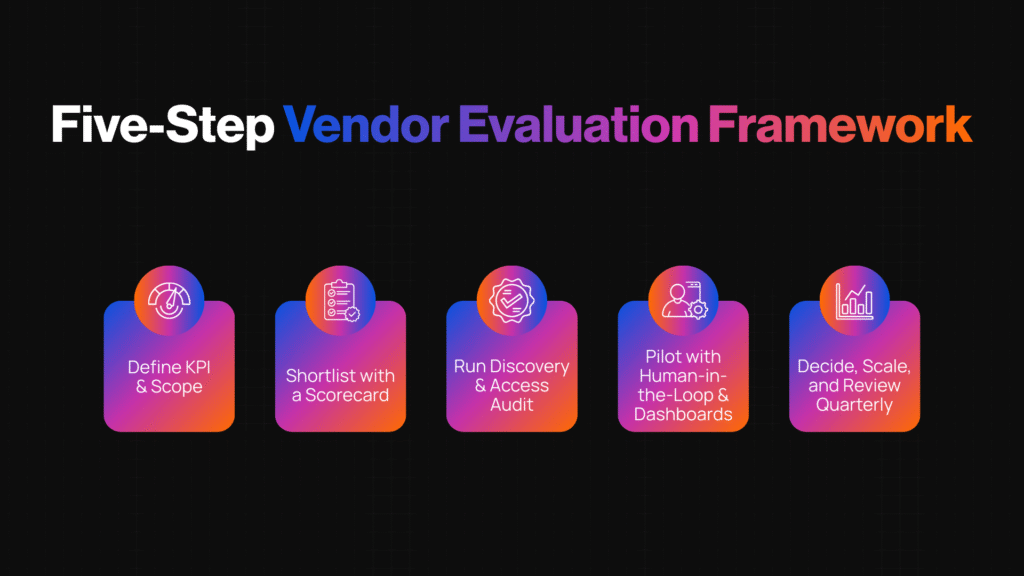
Five-Step Vendor Evaluation Framework
This straightforward, plain-language process helps you navigate the often-complex vendor landscape without losing sight of your goals.
Step 1: Define KPI & Scope
- Example: “Reduce average time-to-fill from 45 to 30 days within 6 months.”
- Pro tip: Involve hiring managers, recruiters, and operations early to align on priorities.
- Clarify which processes you want to automate: sourcing, screening, interview scheduling, or all of the above.
- Define success metrics upfront to guide vendor discussions.
Step 2: Shortlist with a Scorecard
- Create a vendor scorecard based on the evaluation criteria from Section 2. Include: KPI alignment, integration depth, security, HITL design, observability, and pricing transparency.
- Assign weights to each criterion according to your business priorities.
- Shortlist 3–5 vendors for deeper assessment.
Step 3: Run Discovery & Access Audit
- Conduct discovery calls to understand vendor capabilities and fit.
- Request detailed demos focused on your use cases.
- Audit their security, compliance, and integration capabilities with your IT and legal teams.
- Check references to validate claims.
Step 4: Pilot with HITL & Dashboards
- Run a small pilot with real data and users.
- Ensure the pilot includes human-in-the-loop review to catch errors and build trust.
- Use dashboards to monitor AI accuracy, candidate flow, and KPI impact in real-time.
- Gather qualitative feedback from recruiters and candidates.
Step 5: Decide, Scale, and Review Quarterly
- Based on pilot results, decide whether to scale up, adjust, or reconsider.
- Plan quarterly reviews to monitor KPIs, address issues, and optimize AI models.
- Maintain ongoing training and support to maximize adoption and value.
Vendor Questions for AI Automation in Recruitment
Here’s a copy/paste list of vendor questions you can use during your evaluation calls or RFPs:
- How does your AI solution align with common recruitment KPIs like time-to-fill and candidate quality?
- Can you describe your integration capabilities with popular ATS platforms and talent CRMs?
- How do you ensure data privacy and compliance with regulations such as GDPR and CCPA?
- What human-in-the-loop controls are in place to allow recruiters to review and override AI decisions?
- What tools do you provide for monitoring AI performance and troubleshooting issues?
- Could you share examples or case studies demonstrating measurable ROI?
- How transparent is your pricing model? Are there any additional fees we should expect?
- Who owns the AI models, data, and any customizations made during the engagement?
- What is your policy on data portability and exit support if we decide to switch vendors?
- How do you handle ongoing training and support during and after implementation?
Quick Templates
RFP Email Template
Hi [Vendor Name],
We’re exploring AI automation in recruitment to improve our hiring process. Could you please provide detailed information on your solution’s integration capabilities with ATS and talent CRM systems, data privacy measures, and human-in-the-loop features?
We’re also interested in understanding your pricing structure, case studies relevant to our industry, and support during onboarding. Looking forward to your response.
Best,
[Your Name]
Vendor Scoring Rubric (Simplified)
| Criterion | Weight | Score (1-5) | Notes |
| KPI Alignment | 25% | ||
| Integration Depth | 20% | ||
| Security & Compliance | 15% | ||
| Human-in-the-Loop Design | 15% | ||
| Observability & Reporting | 10% | ||
| Pricing Transparency | 10% | ||
| Exit & Portability | 5% |
Final Thoughts
AI automation in recruitment is a powerful lever — but only if chosen and implemented thoughtfully. Use clear criteria and structured evaluation to avoid costly mistakes and ensure your automation aligns with your hiring goals.
Remember: automation should amplify your team, not replace them. Keep humans in the loop, maintain transparency, and monitor outcomes regularly.
If you’re ready to explore AI automation tailored to your unique workflows, booking a free strategy call can help clarify next steps and avoid common pitfalls.