
What’s the first step to smarter hiring?
Start with what’s slow, repetitive, and frustrating for your team and your candidates.
If you’re still manually screening resumes, juggling calendars over email, or rewriting offer letters every time… you’re not alone. These recruitment workflows are among the easiest to automate and the most painful to delay.
The good news? You don’t need to overhaul your whole system or buy a bloated platform. A few targeted automations can remove the bottlenecks, speed up hiring, and protect candidate experience.
This is your plain-English guide to where to start (and what not to touch yet).
Why this matters to operators, not just HR
Whether you’re a founder, COO, or RevOps lead, recruiting touches your bottom line.
- Slow hiring = revenue delays. Hiring bottlenecks can postpone sales coverage, project launches, and customer onboarding.
- Manual resume screening eats up 40–60% of recruiters’ time (SHRM).
- Interview scheduling can delay hiring by 6–10 days per candidate when done manually (Yello Hiring Experience Report).
- Candidates drop off fast when communication lags especially Gen Z talent (Lever 2023 Talent Benchmarks).
- Automating early-stage workflows reduces time-to-hire by up to 35% and lowers cost-per-hire by 25% (McKinsey).
You don’t need to wait for a massive HR tech transformation. You can start with a few smart moves especially if you work with a vendor that understands your operating reality.
What makes a recruitment workflow worth automating?
Not all workflows are equally ready. Here’s how to spot the quick wins:
- High volume: Happens dozens or hundreds of times each month
- Rule-based: Can follow repeatable criteria (e.g. job fit, availability, location)
- High time cost: Takes too much human effort for the value created
- Low risk: A mistake doesn’t result in a legal, brand, or compliance firestorm
- Candidate-visible: If improved, boosts candidate experience and employer brand
Automation here won’t just save time it’ll also tighten handoffs, increase recruiter capacity, and improve the experience for everyone involved.
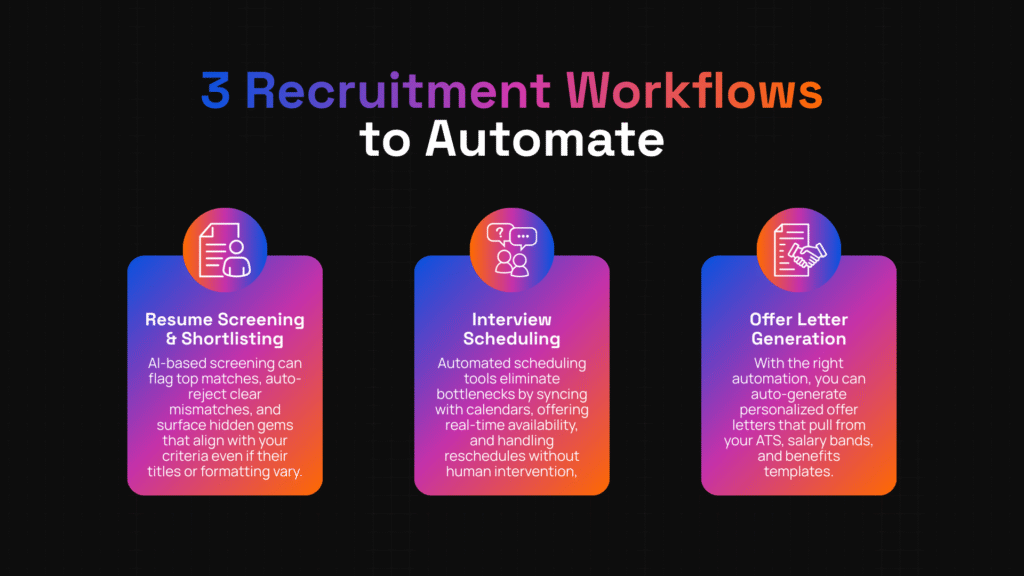
3 Recruitment Workflows to Automate First
1. Resume Screening & Shortlisting
Still manually reviewing every resume that comes in? This is the #1 time drain for most recruiting teams.
AI-based screening can flag top matches, auto-reject clear mismatches, and surface hidden gems that align with your criteria even if their titles or formatting vary.
- Example: A B2B tech company reduced screening time from 5 hours to 1 hour per role by layering in automated screening based on skills, job titles, and years of experience.
- Pro tip: Make sure your vendor can explain how their system avoids bias (e.g. not penalizing for career breaks or school names).
Companies using resume automation report up to 75% faster shortlisting
2. Interview Scheduling
Coordinating calendars is tedious for recruiters and frustrating for candidates. When interview coordination drags, candidates drop off or lose interest.
Automated scheduling tools eliminate this bottleneck by syncing with calendars, offering real-time availability, and handling reschedules without human intervention.
- Example: A SaaS startup cut time-to-interview by 5 days by using a calendar-linked scheduling bot for both panel interviews and phone screens.
- Pro tip: Look for systems that can handle multiple time zones, interviewer pools, and role-specific logic (e.g. technical screen before panel).
Interview automation can reduce time-to-hire by up to 30% (SHL)
3. Offer Letter Generation
The final step can be just as painful. Recreating offer letters, chasing approvals, and manually editing comp fields creates friction and delays.
With the right automation, you can auto-generate personalized offer letters that pull from your ATS, salary bands, and benefits templates.
- Example: A growth-stage fintech firm cut offer turnaround from 3 days to same-day delivery by integrating their ATS with offer automation.
- Pro tip: Make sure legal-approved templates are version-controlled and editable with tracked changes for quick customizations.
Automated offer generation improves acceptance rates by 11% (Greenhouse)
What to avoid automating (for now)
Some things are better left manual or at least reviewed by a human before being sent out.
- Final hiring decisions: These need context, chemistry, and human judgment.
- Rejection emails: Auto-rejections may feel cold or legally risky. Always review.
- Interview evaluation scoring: Unless well-trained and reviewed, automation here can reinforce bias or create mistrust.
- Culture fit assessments: These are hard to codify and easy to mishandle.
- Edge cases: Unusual profiles, visa needs, or senior roles often require personal touch.
Pro tip: Start with “assistive automation” (e.g. draft mode, suggestions, side-by-side review) before going fully automatic.
Key vendor-neutral traits to look for
When choosing an AI automation partner for recruitment workflows, it’s not just about features. Ask:
- Do they integrate with your ATS, HRIS, and calendars? (Avoid data silos.)
- Can humans override automation at key stages?
- Is there an audit trail of decisions made?
- How do they protect candidate privacy and comply with data regulations?
- Can they explain how their automation logic works?
How to Evaluate Vendor Really: A 5‑Step Framework + Criteria in Action
Once you know which recruitment workflows to automate first (resume screening, interview scheduling, offer letters), the next step is choosing the right vendor. Here’s a structured way to compare vendors using real criteria and a proven framework, so you avoid common mistakes.
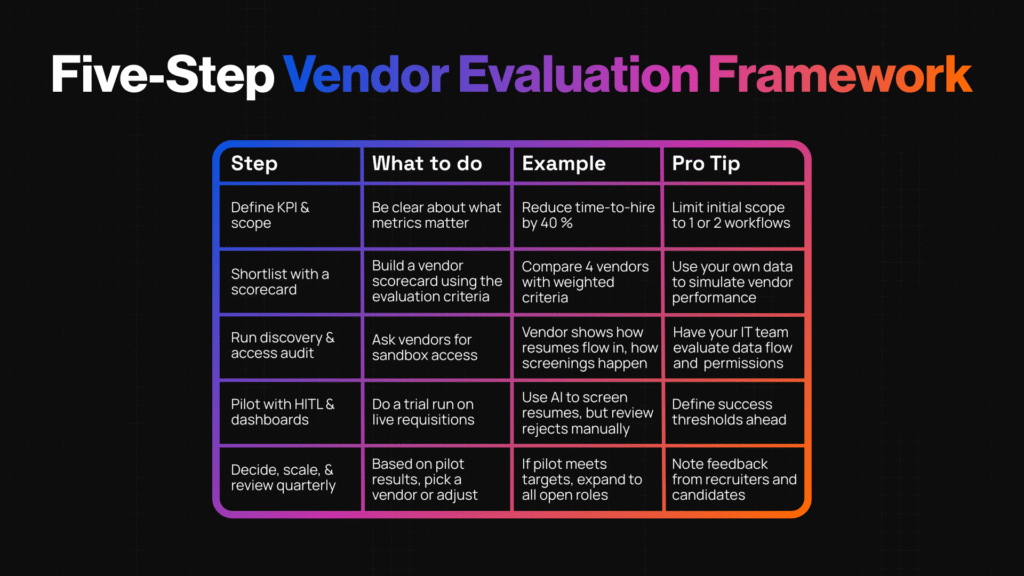
Five‑Step Vendor Evaluation Framework
Use this process to test vendors methodically. It helps reduce risk, costs, and “buyer’s remorse.”
| Step | What to Do | Example | Pro Tip |
| 1. Define KPI & scope | Be clear about what metrics matter time‑to‑hire, candidate NPS, cost per hire, quality of hire, error rates in offer letters | Example: “Reduce time‑to‑hire by 40 %, improve offer acceptance by 15 %, maintain candidate satisfaction ≥ 4.5/5” | Pro tip: Limit initial scope to 1 or 2 workflows (e.g. resume screening + interview scheduling) so you can measure impact cleanly |
| 2. Shortlist with a scorecard | Build a vendor scorecard using the evaluation criteria (integration, security, human‑in‑loop, observability, etc.) | Example: Compare 4 vendors with weighted criteria: Integration 20%, Security 20%, Observability 15%, Human oversight 15%, Cost 10%, Support/training 10%, Portability 10% | Pro tip: Use your own data (volume of hires, types of roles) to simulate vendor performance during scoring |
| 3. Run discovery & access audit | Ask vendors for sandbox access, see how their solution connects to your ATS, calendar, HRIS, and how data flows | Example: Vendor shows how resumes flow in, how screenings happen, how offer letters are drafted and approved with your templates | Pro tip: Have your IT/security team evaluate data flow, encryption, user roles & permissions early on |
| 4. Pilot with Human‑in‑the‑Loop & dashboards | Do a trial run on live requisitions; keep humans in the loop for decisions like interviews and offers; review dashboards weekly | Example: Use AI to auto‑screen 50 resumes, but recruiter reviews rejects; schedule with auto‑scheduler, send draft offer letters for human edit | Pro tip: Define success thresholds ahead (e.g. false reject rate < 5%, candidate satisfaction ≥ 4/5, time saved ≥ 50%) |
| 5. Decide, scale, and review quarterly | Based on pilot results, pick a vendor or adjust; then scale. But revisit KPIs, ROI, feedback every quarter | Example: If pilot meets targets, expand to all open roles; if not, adjust screening criteria, retrain model, or switch vendor | Pro tip: Include feedback from recruiters and candidates in quarterly reviews don’t rely only on dashboard metrics |
Data & Stats That Prove These Steps Work
Here are stats and case studies showing how following evaluation criteria and structured approaches pay off.
- Organizations report 35% reduction in time‑to‑hire and 28% decrease in cost‑per‑hire when they adopt AI for recruitment workflows with governance & metrics in place. aialpi.com
- A global enterprise using AI + dashboards cut time‑to‑hire from 60 to 35 days (≈ 42 % drop), improved recruiter productivity by 45 %, and saved millions in agency fees. mihcm.com
- Human‑in‑the‑Loop (HITL) implementations increase accuracy, cut false positives, and improve compliance one set of case studies showed up to 5× faster processing and error reductions of over 60–70 % when critical decisions include human oversight. parseur.com
- But risk remains: only about 25 % of organizations feel they have strong AI governance / risk frameworks when deploying recruitment AI. thetalentpool.ai+1
- In “Reducing Time‑to‑Hire with AI: Strategies and Case Studies,” companies routinely cut hiring cycles from 45‑60 days down to 20‑30 days (≈ 40‑60 % faster) with automated screening, scheduling, funnel analytics. techtree.dev
These prove that when you evaluate vendors well, use pilots, ensure oversight and observability, you get significant ROI and avoid costly failures.
Extra Decision Criteria in Real Use
Beyond the earlier checklist, here are vendor traits you’ll really see make a difference in pilots or roll‑outs.
- Bias mitigation & transparency: Model explainability, ability to adjust scoring, audits. When vendors show “how they decide,” you avoid surprises. thetalentpool.ai+1
- Flexibility in customization: Able to support custom templates for offer letters, ability to adjust screening rules per role, multi‑time‑zone scheduling, etc.
- Candidate experience features: Automated status updates, reschedule options, feedback loops, chatbot / FAQ support. These protect employer brand even as automation advances. All About AI+1
- Security, compliance & governance maturity: Encryption in transit & at rest, compliance with GDPR / EEOC / other local laws, audit logs, access controls. thetalentpool.ai+1
- Support & enablement: How vendors train your team, documentation, how they handle change management. A vendor that helps you on‑board and trust the automation is far better than one that drops a tool in and walks away.
Common Pitfalls in Vendor Selection & How to Avoid Them
Here are problems people often run into when evaluating vendors, and quick fixes.
- Pitfall: Being dazzled by features but ignoring integration hurdles → Avoidance: Ask vendors to connect with your real ATS / HRIS in sandbox. Test the read/write API flows.
- Pitfall: Skipping pilot or limiting pilot to very low volume → Avoidance: Pilot in realistic volume and roles so you can see edge cases.
- Pitfall: Overpromising quality without metrics on false rejects / false positives → Avoidance: Request vendor’s error rates, blind test data, or case study thresholds.
- Pitfall: Weak human oversight → Avoidance: Ensure human‐in‐the‑loop during screening or offer decision points.
- Pitfall: Poor candidate experience due to lack of personalization or delayed communications → Avoidance: Build in automated updates, reschedule options, maintain tone by human review in key messages.
Vendor Questions You Can Use
Here are vendor questions to cover during vended discovery, aligned to this evaluation framework:
- How do you measure success for recruitment workflows like interview scheduling or offer letters? What KPIs do you guarantee / track?
- Can you show a case where you reduced time‑to‑hire by 40‑60 % using your automation + human‑in‑loop?
- What bias audits have you done (e.g. for screening models)? How do you handle false rejects?
- How do you integrate with my ATS, calendar systems, HRIS? Do you support read/write access, events/triggers?
- What security/compliance certifications do you hold (GDPR, SOC2, ISO, etc.)? How is data encrypted and audited?
- What dashboards or observability tools do you provide? Can team see logs or rollback bad screenings or wrong offer data?
Case Studies & Real‑World Proof
Seeing real numbers helps you decide where to invest without hoping.
- A global RPO (Recruitment Process Outsourcing) provider used recruitment automation and saw 3× ROI, saved 80.7 recruiter‑days in candidate screening, and achieved 94% of applications reviewed within 72 hours. CSAT (Candidate Satisfaction Score) was 95.4%. impress.ai
- An investment management company in Southeast Asia deployed AI for screening, interview scheduling, and virtual assistant follow‑ups. Results: 42% reduction in candidate drop‑off, 5× ROI, and saved 3,483 hours of recruiter time across its graduate programs. impress.ai
- PwC integrated automated resume scoring, bulk interview scheduling, and standardised interview workflows. They saw a 54% reduction in time‑to‑hire and improved conversion rates significantly. talview.com
- For a major enterprise in KSA, automating interview scheduling (with synced calendars + reminders) dropped scheduling time by 70%. Other bottlenecks (like manager feedback) were reduced, time‑in‑stage fell by 36%, quality of hire improved (90‑day productivity up by 12%), early attrition dropped by 14%. evalufy.com
These examples show: when you automate the right recruitment workflows (resume screening, interview scheduling, offer letters, candidate communication), and you measure properly, you can see big wins in cost, speed, and quality.
Adoption Tips: Rolling Out Automation Without Resistance
Even with solid tech, adoption can fail if you don’t plan for people and change. Here are key tactics.
- Stakeholder alignment early: Bring recruiters, hiring managers, operations, and IT into vendor discussions. Let them help define KPIs. If they feel buy‑in, adoption climbs.
- Training + Enablement: The best automation tools are useless if your team doesn’t trust them. Hands‑on training, playbooks, shadowing, sample workflows help. Let team test in draft mode.
- Human‑in‑the‑Loop & Feedback Loops: Always keep humans in decision points at first especially for high stakes (final interviews, offers). Collect feedback from candidates, recruiters, hiring managers. Use dashboards and qualitative data.
- Measure candidate experience: Track drop‑off rates, survey candidates about clarity and speed. For example, when interview scheduling is slow, ~49% of candidates decline offers. withe.co+1 Automate scheduling to reduce that risk.
- Communication & transparency: Tell candidates how AI is used (e.g. “We use automated resume screening”, “We will schedule interviews via this tool”). Studies show people are more comfortable with AI when there is transparency. Lifewire
Exit Plan & Portability: Don’t Get Locked In
Automation partners should enhance your ops; you shouldn’t feel stuck.
- Make sure IP ownership of workflows, prompts, screening criteria belongs to you (or is shared clearly).
- Ask for data export formats (e.g. raw candidate data, metrics, evaluation logs).
- Ensure your automation setup is modular: you should be able to turn off or swap components (e.g. move from vendor A’s screening engine to vendor B) without rebuilding everything.
- Keep documentation: how screening rules were built, thresholds, template versions for offer letters. Without this, you lose context if teams change or you want to change vendors.
Vendor Questions to Cross‑Check at Exit Stage
Use these to protect your team and future options.
- If we stop working together, how do we export: candidate data, workflows, screening templates, evaluation metrics?
- What portions of the system are proprietary (vendor‑owned modules or models)? What parts are standard or user‑configurable?
- How is versioning handled (templates, prompts, offer letter wording)? Who approves changes?
- What are your service level commitments (SLAs) for uptime, support, bug fixes, especially during peak hiring seasons?
- Are there clauses in your contract about data retention, ownership, training or enabling our team to maintain parts of the system?
Final Thoughts & Next Steps
You don’t need to automate everything at once. Start with workflows that are high‑volume, low‑risk, and make an immediate difference: resume screening, interview scheduling, offer letters, and candidate communication.
Aim for vendors who align on KPIs, have strong integration depth, ensure human oversight, offer transparency on security, and provide exit/portability paths. Use pilot phases and real case studies to test fit and risk.
If you’re looking to explore this for your team, Autofuse.ai helps map out which recruitment workflows to automate first, using your existing tools, priorities, and culture.