
You’re not here for another AI pitch. You’ve already seen the hype, the demos, maybe even a few pilot projects. But the real question is: How do you pick the right AI automation platform one that actually delivers value inside your business?
Some teams try to build it all in-house. Others buy a “black box” tool and hope it connects with their stack.
Both paths can work. Both can burn time and budget fast.
What matters most is knowing which path fits your business, right now and having a framework to reevaluate when things change.
This guide is built for operators, not theorists. COOs, RevOps leads, support heads, and IT owners trying to bring AI into real systems like CRM, ERP, help desks, and phone flows.
Let’s make that job easier.
Why it matters (and why it’s getting harder)
- Most AI pilot projects fail not because of bad models, but bad workflows.
Only 5% of enterprise GenAI deployments create measurable financial impact (MIT Sloan) - 95% of IT leaders say integration bottlenecks are blocking AI at scale
(MuleSoft Connectivity Benchmark) - Off-the-shelf AI tools often ignore human-in-the-loop needs and fall apart in real ops.
- Building custom workflows from scratch can drain engineering cycles and miss governance needs.
- Teams often overcommit to “build” too early or stay stuck in “buy” mode with rigid platforms.
What to actually look for in an AI automation company
Forget vague claims like “powered by GPT” or “enterprise-ready.” You need a platform and a partner that fits your business, data, and risk posture.
Here’s a practical, vendor-neutral checklist:
Business outcomes & KPI alignment
Is the automation mapped to a clear operational outcome?
- Response time reduction
- Revenue per rep
- SLA adherence
- Call deflection rate
- Lead-to-opportunity velocity
If there’s no measurable KPI, it’s just an experiment not automation.
Integration depth (beyond surface-level apps)
Can the platform read/write to your actual systems?
- CRM (HubSpot, Salesforce)
- Help desks (Zendesk, Freshdesk)
- Phones (Twilio, RingCentral, Aircall)
- ERPs and ticketing tools
- Custom databases or APIs
Also: Can it listen to events, not just poll endpoints? That’s key for near-real-time automation.
Security, privacy, and governance
This isn’t just IT’s job. Every automation touches sensitive data.
Ask:
- Where are prompts stored?
- Are logs encrypted and redactable?
- Can we audit model outputs?
- Do we own the workflows?
Look for SOC 2 Type II, HIPAA, or ISO 27001 if you’re in regulated industries.
Human-in-the-loop (HITL) & escalation logic
No AI system should operate without human override especially in sales, support, or legal use cases.
Can agents see and approve AI actions?
- Drafted email replies
- Suggested updates in CRM
- Automated status changes
Good AI helps humans not replaces them blindly.
Observability & monitoring
How will you know if the automation is working?
You need:
- Traces: to see what models did
- Dashboards: showing volumes, accuracy, escalations
- Rollbacks: in case AI goes off track
- Evaluation sets: to score accuracy over time
You can’t fix what you can’t see.
Delivery plan & enablement
What happens after the go-live?
You want:
- Playbooks: not just docs
- Admin training: for your ops and IT
- Slack channels or office hours: for iteration
- Embedded champions: to maintain the system long-term
Avoid partners who “install and vanish.”
References and methodology
Proof beats pitch. Ask for examples that match your ops size and stack.
Bonus points for:
- Public case studies
- Methodologies (e.g., 6-week pilot, 90-day scorecard)
- Visible frameworks, not handwavy “AI magic”
Pricing transparency & asset ownership
You don’t need fixed prices but you do need clarity.
- What drives cost? (volume, usage, seats?)
- Do you own your prompts, workflows, diagrams, evals?
- Can you take them if you switch vendors?
Too many companies find themselves locked into platforms with no way out.
Exit plan & portability
AI systems change fast. Don’t build on sand.
You need:
- Clear prompt libraries
- Documented flows
- Eval sets and test cases
- Exportable configs
Make it easy to switch tools or bring work in-house later.
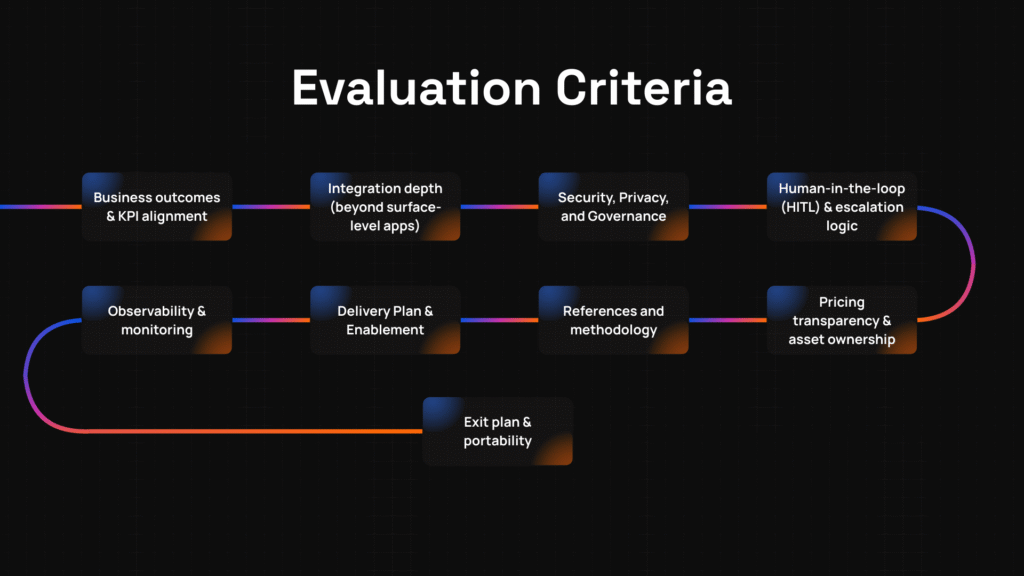
Evaluation criteria: what to compare in an AI automation platform
These are the signals that actually matter when you’re comparing vendors or deciding to build. Use this checklist to assess both paths fairly:
- Business outcomes & KPI alignment
Does the automation map to real‑world metrics you care about? For example: reducing time to resolution, lowering error rates, improving customer satisfaction, or increasing throughput. If your AI tool doesn’t have goals you can measure, you’ll struggle later. - Integration depth
Can the system connect to your core tools CRM, help desk, phone systems, ERP, ticketing? Does it need only read access, or read + write + event triggers? The deeper and more “real‑time” the integration, the stronger the automation. - Security, privacy, and governance
How do they store data? Are audit logs available? What compliance standards do they meet (GDPR, HIPAA, SOC 2 etc.)? Does the vendor allow you control over your data, your models or prompts? Make sure vulnerabilities, breaches, or drift can be surfaced and addressed. - Human‑in‑the‑loop & escalation design
Automation should support, not replace, human judgment especially in edge cases or decisions with risk. How are escalation paths laid out? Who approves automated outputs before they go live when mistakes matter? - Observability & monitoring
You want clear dashboards, metrics for failure/error rates, logs/traces, and mechanisms to rollback or correct automated actions. Without visibility, things break quietly and trust erodes. - Delivery & enablement plan
What’s the onboarding like? What training, playbooks, knowledge transfer will you get? How are internal champions involved? How do you maintain and iterate the system once live? - References, case signals & methodology
Ask for real case studies, ideally in your industry or with similar scale. What methodology did they follow (how long pilot ran, error rates measured, accuracy, etc.)? You want proof, not just promises. - Pricing transparency & asset ownership
How is pricing structured by usage, volume, seat, data throughput? Which parts you own: prompts, custom workflows, diagrams, evaluation sets? If vendor owns too much, switching or building later becomes hard. - Exit plan & portability
In a year or two, you might want to change tools or bring work in‑house. Can you export your workflows, data, models, prompts? Is everything documented so the transition is smooth?
Common pitfalls & one‑line fixes
Here are pitfalls that tend to trap teams and quick fixes to avoid them:
- Trap: Automating inefficient or irrelevant workflows → Solution: Audit what’s really broken first; only automate high‑value tasks. Decimal Solution+1
- Trap: Skipping human oversight → Solution: Build in checkpoints; never assume AI will always get it right. UMA Technology+1
- Trap: Poor data quality or disconnected systems → Solution: Clean, centralize, unify your data before automating. Decimal Solution+2ITD Tech+2
- Trap: Vague or unrealistic success metrics → Solution: Define clear KPIs tied to business outcomes; measure continuously. Decimal Solution+1
- Trap: Underestimating governance, privacy, and compliance risk → Solution: Include legal/security teams early; demand auditability and data ownership. ITD Tech+2UMA Technology+2
- Trap: Thinking AI fixates only on technological tools; neglecting change management → Solution: Train people, set expectations, build internal process ownership. Lifewire+2UMA Technology+2
- Trap: Not planning for errors, drift, or scaling → Solution: Monitor performance, version control, clear rollback paths. UMA Technology+1
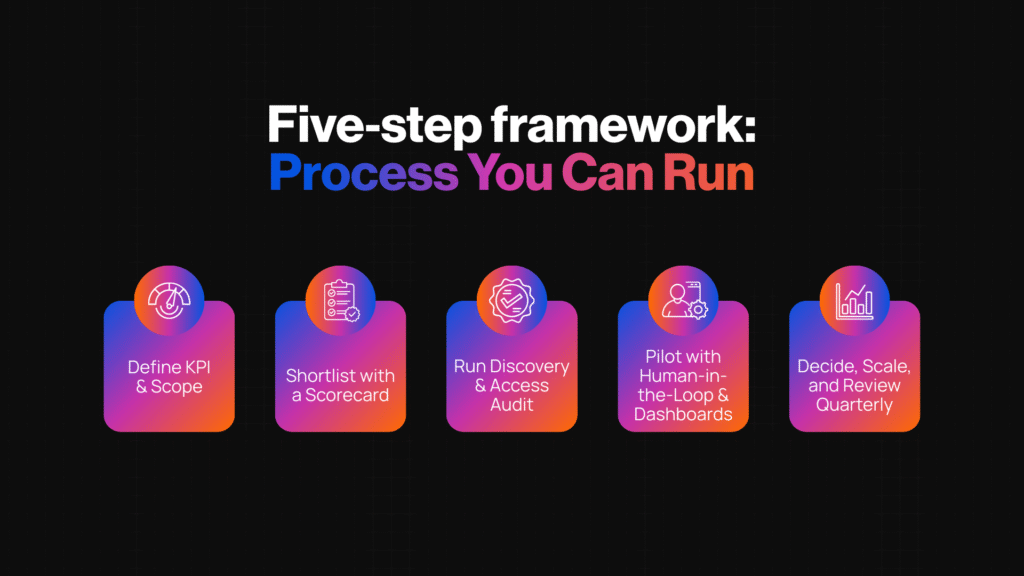
Five‑step vendor framework: process you can run
Here’s a process to systematically decide build vs buy including selecting vendors.
Step 1: Define KPI & scope
- Example: You want support ticket resolution time down by 30% in 90 days, and a reduction of agent handling cost by 20%. Scope: triage + canned responses + escalation logic.
- Pro tip: Limit scope to 1‑2 automations you know well. It’s easier to succeed small than flail big.
Step 2: Shortlist with a scorecard
- Example: Rate 4 vendors + “build in‑house” option across your evaluation criteria (integration, observability, ownership, etc.). Use a 1‑5 scale.
- Pro tip: Set the weight of each criterion based on what matters most (e.g. if security is critical, give it more weight).
Step 3: Run discovery & access audit
- Example: Ask each vendor to map precisely how they’d integrate with your stack: what data flows, who needs what permissions, where are risks or manual handoffs. For build path: map your own tech gaps.
- Pro tip: Involve your IT/security/DevOps team early. They’ll spot blockers vendors often don’t advertise.
Step 4: Pilot with human‑in‑the‑loop & dashboards
- Example: Run a 4‑8 week pilot automating a subset of the workflow; humans still review outputs; gather error rates, user satisfaction, cost saved.
- Pro tip: Build dashboards for key metrics (error, adoption, time saved). Post mortem pilot before scaling.
Step 5: Decide, scale, review quarterly
- Example: After pilot, pick whether to buy or build. If buying, negotiate portability & SLA terms. If building, ensure documentation & code ownership. Meanwhile define quarterly review points.
- Pro tip: Treat every operational cycle (quarter) as chance to revisit assumptions vendor performance, costs, changing needs.
Vendor questions: copy‑&‑paste sheet
Use these with vendors or include in your RFP / internal evaluation. Should help you probe beyond surface promises.
- What integrations do you support including read, write, and event‑trigger modes for CRM, help‑desk, phone systems, ERP, ticketing etc?
- How do you manage data security, privacy, compliance? Which certifications do you hold (e.g. SOC 2, ISO 27001, GDPR, HIPAA)?
- Describe human‑in‑the‑loop / escalation workflows: when & how do humans review or override AI outputs?
- What observability features do you provide (dashboards, error tracing, rollback, evaluation sets)? Can we see them in a pilot?
- Who owns custom assets: workflows, prompts, configuration, diagrams, evaluation datasets? How portable are they?
- What is your pricing model: usage, seats, data volume etc? What are hidden or variable costs (maintenance, support, data storage, integrations)?
- Can you provide references / case studies in our industry / with similar scale to ours? What metrics did you track (accuracy, error rate, impact on KPIs)?
- What is your enablement plan: onboarding, training, internal champions, documentation, playbooks?
- What happens if we want to exit / migrate off your platform? What assets / data / configurations do we retain, and in what formats?
Proof points: what case studies tell us
Here are real‑world examples of how companies got value from AI tools or automation platforms either via buying or integrating with existing systems. These help illustrate what “good” looks like.
- A recent UK/EU survey of B2B revenue leaders found that nearly two‑thirds reported ROI from AI adoption in the first year. 19% saw return within three months, 27% between 3‑12 months. IT Pro
- In manufacturing, one Fortune 500 firm achieved 300% ROI in eight months with AI automation saving US$2.3 million annually and improving operational efficiency by 75%. Agentic Dream
- In cross‑industry case studies of AI workflow automation tools: cost savings of up to 25‑32%, fraud or error reductions of 40%, and productivity / satisfaction improvements around 20%. AI For Businesses
- H&M rolled out an AI virtual assistant / chatbot in both app and web, resolving ~70% of customer queries without human help, boosting conversion on chatbot‑assisted sessions by 25%, and speeding response times ~3×. LinkedIn
- One case in sales automation showed a company reducing lead qualification time by ~70%, increasing conversion rates from 10% to ~25%, so huge efficiency gains. SuperAGI
These show that with the right platform or build, real gains in efficiency, cost, and customer experience are possible and often sooner than you expect.
Quick templates
Here are two templates you can copy/paste to speed up vendor evaluation or internal buy‑in.
Vendor RFP / Outreach Template
Subject: Evaluating AI Automation Platform for [Your Use Case]
Hi [Vendor Name],
We are evaluating AI automation software to address [scope: e.g. support triage, FAQ automation, lead qualification] and want to understand if your solution can meet our needs. Specifically:
• Integrations (CRM, help desk, ERP, data pipelines) + event‑trigger capabilities
• Human‑in‑the‑loop vs full automation / escalation logic
• Observability: dashboards, error rates, rollback, evaluation sets
• Asset ownership & portability (prompts, workflows, test data)
• Pricing model including variable / hidden costs
• References or case studies in similar scale or industry
Could you share a pilot plan + architecture sketch + recent case metrics? Thanks,
[Your Name / Role]
Scorecard Template
Use this as a tool when comparing vendors vs building in‑house. Give 1‑5 scores and weight criteria per importance.
| Criteria | Weight (1‑100) | Vendor A | Vendor B | Build In‑House | Notes |
| KPI alignment | 20 | 4 | 3 | 5 | Which matches our strategic goals |
| Integration depth | 15 | 3 | 4 | 5 | Do they connect to our CRM, ERP etc? |
| Observability / monitoring | 15 | 4 | 2 | 5 | Can we see error rates, rollbacks etc? |
| Security & governance | 20 | 5 | 4 | 5 | Certifications, audit logs etc |
| Enablement & support | 10 | 3 | 3 | 4 | Training, playbooks, handover |
| Ownership & exit plan | 10 | 4 | 5 | 5 | Can we export workflows etc? |
| Total | 100 | ‑ | ‑ | ‑ | ‑ |
Final thoughts & next step
Choosing the right AI automation platform or deciding to build your own comes down to clarity not hype.
You want:
- Measurable outcomes (real KPIs),
- Deep integration into your systems,
- Observability and human oversight,
- Clear ownership and exit options.
If you follow the criteria, avoid common traps, use the scorecard, you’ll make that call with confidence.
If you’re ready, let’s take this beyond theory. Book a free strategy call to map your current workflows, run this framework, and decide the build‑vs‑buy path that makes sense for you.