If you’re evaluating AI integration services to tie together your CRM, help desk, phone systems, and TMS; you don’t want vendor hype. You want a partner who understands your workflows, improves efficiency, and keeps things safe and visible. That’s what this section is about clarity, not fluff.
Why AI Integration Services Are a Must for B2B Operations
- Unified efficiency. Automation across platforms eliminates redundant input, speeds response time, and keeps data in sync.
- Better customer experience. Agents get context-rich views of customers, regardless of system.
- Cross-system intelligence. AI can surface insights from CRM, trigger actions in help desks, notify through phone alerts, or feed TMS workflows.
- Cost and error reduction. Automating common flows can slash manual workloads by 30–50% while improving accuracy across teams.
- Trust through transparency. With proper observability, governance, and human oversight, AI becomes a reliable extension, not a black box.
Pro tip: Start with the pain point that hits hardest, maybe manual call logging across systems and use that win to expand.
What to Expect from Robust AI Integration Services
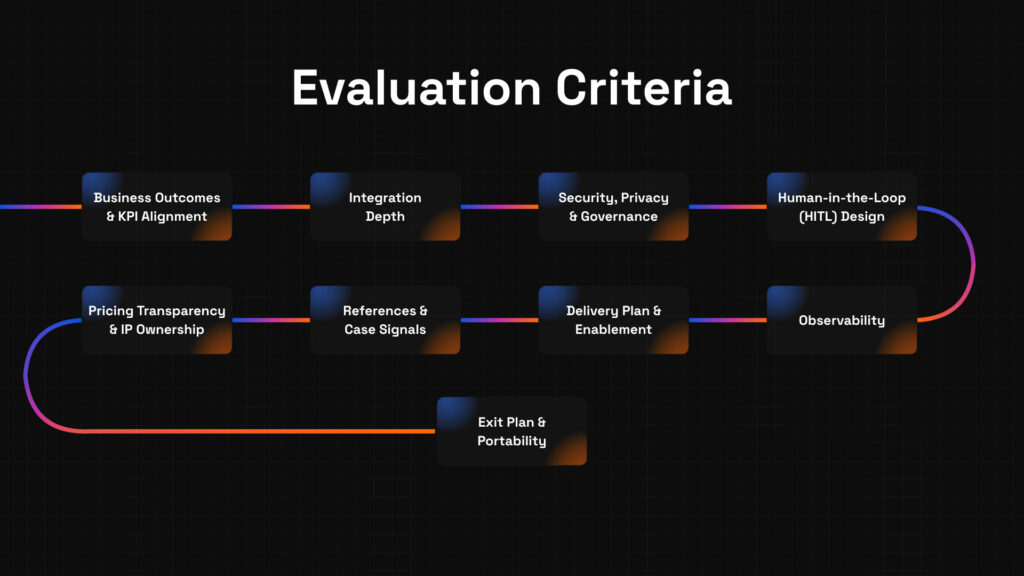
Here’s your evaluation checklist, designed to help you compare vendors without drowning in hype:
- Business Outcomes & KPI Alignment
Vendors should ask: “What process are you optimizing; ticket response? call logging? translation?” If they pivot to generic AI talk, ask again. - Integration Depth (CRM, Help Desk, Phone, TMS)
Two-way integration with event triggers (e.g., new ticket → TMS update) avoids siloed workflows and duplicate work. - Security, Privacy & Governance
Verify encryption, role-based access, audit trails, and compliance with GDPR or industry standards from day one. - Human-in-the-Loop (HITL) & Escalation
Confident triggers and fallback paths rejecting low-trust AI actions in favor of human review, build reliability. - Observability (Traces, Dashboards, Rollback)
Real-time dashboards, detailed logs, and fallback options are non-negotiable for maintaining trust and control. - Delivery & Enablement (Playbooks, Training, Handover)
The project shouldn’t end at go-live. Your team should walk away understanding how to manage, tweak, and build on the integration. - References/Case Signals & Methodology
Look for case studies with measurable results in similar tech stacks; say, “CRM + Help Desk + TMS integration reduced manual transfers by 40%.” - Pricing Transparency & IP Ownership
Whether your model is usage-based or time-based, the structure must be clear. Clarify who owns workflows, models, or prompt sets you create. - Exit Plan & Portability
If you switch vendors, can you export integration mappings, workflows, or training data? Lock that in beforehand.
Example in Practice
A mid-size B2B firm connected their CRM, phone system, and help desk using vendor-provided AI workflows. Agents saw incoming call context before picking up, updated tickets automatically, and flagged high-value opportunities in the CRM all with human approval of sensitive actions. The result? A 35% reduction in call handle time and 25% faster ticket resolution.
Pitfalls to Watch For—One-Liner Fixes
- Trap: Overpromising AI magic → Fix: Evaluate by results, not demos.
- Trap: Ignoring integration complexity → Fix: Audit architecture before scaling.
- Trap: Skipping governance → Fix: Tap into security teams early.
- Trap: No HITL safeguards → Fix: Define escalation upfront.
- Trap: Invisible automation → Fix: Require dashboards and rollback tools.
- Trap: No internal enablement → Fix: Make training part of scope.
- Trap: Vendor lock-in → Fix: Secure portability from day one.
- Trap: Surprise costs → Fix: Demand transparent pricing models now.
5-Step Vendor Evaluation Framework
- Define KPI & Scope
Example: Reduce cross-system ticket handoffs by 40% in two months.
Pro tip: Start small; strike early wins. - Shortlist with a Scorecard
Weight criteria like integration depth, observability, and HITL based on your priorities. - Run Discovery & Access Audit
Walk systems with your IT team surface integration gaps or compliance blockers early. - Pilot with HITL & dashboards
Test in live mode with fallback control and observability turned on. - Decide, Scale, Review Quarterly
Roll out more workflows only after pilot success, keep evaluating performance and governance quarterly.
Vendor Questions to Copy/Paste
- How do your AI integration services connect CRM, help desk, phone, and TMS systems?
- What human-in-the-loop and escalation workflows are included?
- What observability tools and rollback options are available?
- How do you handle governance and compliance (audits, logging, access control)?
- What kind of training and materials help our team manage the integration post-launch?
- Who owns the integration assets we build (scripts, configurations, prompts)?
- What’s your exit strategy, can we export integrations and setups?
Quick Templates to Save You Time
RFP Email Snippet
Hi [Vendor],
We’re evaluating AI integration services to connect CRM, help desk, phone system, and TMS. Could you share how your services support integration depth, observability, HITL workflows, governance, and team enablement? References and pricing transparency are appreciated.
Thanks!
[Your Name]
Vendor Scorecard Snippet
| Criteria | Weight | Vendor A | Vendor B | Notes |
| Integration Depth | 25% | |||
| Security & Governance | 20% | |||
| HITL Workflow Support | 15% | |||
| Observability & Rollback | 15% | |||
| Delivery & Enablement | 15% | |||
| Portability & IP Ownership | 10% |
Making the Evaluation Real: Pilots, Scorecards, and Smart Scaling with AI Integration Services
You’ve defined your needs and shortlisted vendors, now it’s about testing systems, gathering real data, and planning to scale with confidence. This section shows how to:
- Kick off targeted pilots across CRM, help desk, phone, and TMS
- Use well-designed scorecards with real metrics
- Approach pilots with HITL, observability, and governance baked in
- Scale systematically while avoiding common traps
Why Pilots Matter and How to Do Them Right
Jumping into full integration without testing is like flying blind. A sharp pilot unlocks learning, trust, and data.
- Test in real contexts, not sandboxes. Connect CRM, help desk, phone, and TMS workflows for one concrete use case; say, “log calls as tickets with context.”
- Use Human-in-the-Loop (HITL). Let humans review AI outputs when model confidence is low. This avoids errors and builds real confidence.
- Make observability non-negotiable. Dashboards, logs, alerts, and rollback paths ensure transparency and control from day one.
- Measure early metrics. Resolution time, data accuracy, response rates track what moves when systems talk.
- Stay governed. Security, privacy, and audit logs matter even in pilots, don’t slip.
Evidence:
- CRM adoption is near-universal 91% of companies with 11+ employees use CRM—but pilot integrity matters because over 70% of implementations fail due to poor planning or adoption gaps ZipDoCirrus Insight.
- AI-led CRM interactions are front and center, with 75% of customer service tasks expected to be powered by AI by 2025 SuperAGI.
Step-by-Step: Smart Pilot Blueprint
- Outline Pilot Goals Narrowly
⦁ Example: Auto-logging inbound calls in CRM, with HITL approval for uncertain tags.
⦁ Pro tip: Keep the scope tight one workflow, one KPI in one month. - Build the Scorecard Template
Use weighted criteria to compare vendors—and track pilot success. Sample weights:- KPI Impact – 25%
- Integration Depth – 20%
- Security & Governance – 15%
- HITL Support – 15%
- Observability & Rollback – 10%
- Enablement & Training – 10%
- Portability/IP Ownership – 5%
Collect scores from IT, ops, and end-user teams.
- Audit Access and Compliance Holistically
Ensure CRM, phone, help desk, and TMS are integrated safely even in testing.
Include IT and security stakeholders to sign off before going live. - Run the Pilot with Oversight & Metrics
Enable dashboards and logs. Measure:- Time saved per task
- Error reduction rate
- Human override frequency
- Training issues surfaced
- Review Results & Scale Smartly
Use pilot data to confirm vendor fit. If KPIs are hit and oversight held, roll out systematically one workflow at a time. Review quarterly for performance, security, and team readiness.
Evidence:
Customers using AI-enhanced CRM report 30–50% faster response times, and 41% cite cost reduction via automation DemandSageCirrus Insight. Human oversight elevates accuracy and trust ZipDo.
Common Pilot Pitfalls and Fast Fixes
- Trap: Testing in fake environments → Fix: Use real data and live user context.
- Trap: Hiding errors → Fix: Set up logs and alerts from day one.
- Trap: No fallbacks for AI edge cases → Fix: Build HITL into core workflows.
- Trap: Overestimating early performance → Fix: Measure metric changes, not volume.
- Trap: Overlooking compliance in pilots → Fix: Involve security teams from start.
- Trap: Skipping training → Fix: Include team enablement in every pilot phase.
Example Outcome Snapshot
A sales team integrated call routing across CRM and phone systems with HITL for first-time clients. Results in 4 weeks:
- 25% fewer misrouted calls
- 20% faster ticket opening
- Zero compliance incidents
- High trust score from agents via dashboard transparency
This real-world test provided critical data and helped build buy-in across ops, security, and frontline teams.
Sealing the Deal: Tools, Vendor Questions & Next Steps
You’ve scoped needs, run pilots, and gathered data. Now the final push: vet vendors thoroughly, align stakeholders, and confidently book your next step. This section gives you:
- Critical vendor questions for clarity and peace of mind
- Two templates you can reuse immediately (RFP kickoff + Scoring sheet)
- Final guidance to choose wisely
- A friendly, low-friction next step aligned with the brand tone
Essential Vendor Questions (Copy & Paste Ready)
These questions dig into the core of fit strategy, risk, governance, and future flexibility.
- How do your AI integration services tie specific automation outcomes to business KPIs?
- Which systems do you integrate with directly CRM, help desk, phone, and TMS? Are reads and writes supported?
- How do you bake in human-in-the-loop design to handle edge cases and uncertainty?
- What observability tools like dashboards, logs, alerts, rollback options come standard?
- How are compliance, auditability, and governance managed (e.g., encryption, access control, logs)?
- What enablement is included? Playbooks, training sessions, documentation?
- Who owns the AI assets workflows, prompts, models after deployment?
- What provisions exist for exit and portability of your integrations?
- Can you share client stories especially ones similar to our stack and stage?
- How is pricing structured, and what scaling factors affect cost?
Pro tip: Use these questions in a joint session with IT, operations, and frontline stakeholders. Spread the spotlights don’t let one team lead alone.
Quick Templates You Can Copy/Paste
RFP Kickoff Email
Subject: AI Integration Partner Exploration
Hi team,
We’re considering AI integration services to connect our CRM, help desk, phone, and TMS workflows. The goal is efficient context-sharing, automated routing, and smart escalation all with oversight.
Key criteria:
– Defined KPIs (speed, accuracy)
– Human-in-the-loop fallback
– Full observability
– Security and governance baked in
– Clear exit and portability
I’d like to align on internal stakeholders and scope before reaching out to vendors. Let’s meet tomorrow for 20 minutes ops, security, and support leads included.
Thanks,
[Your Name]
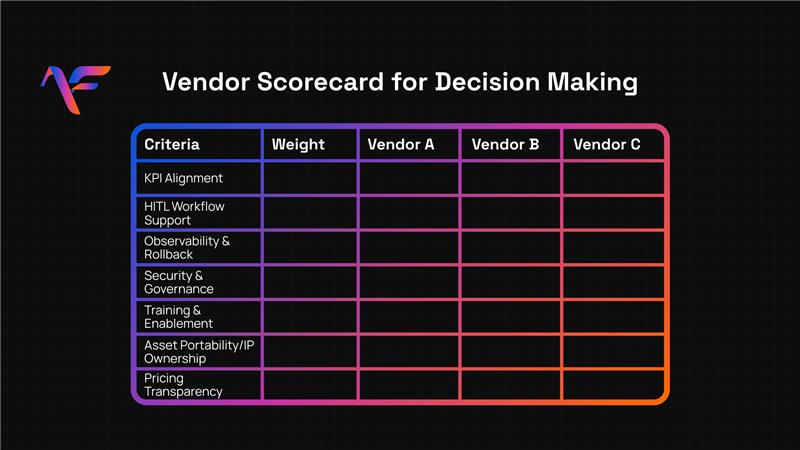
Vendor Scorecard for Decision-Making
| Criteria | Weight | Vendor A | Vendor B | Notes |
| KPI Alignment | 20% | |||
| Integration Depth | 20% | (CRM, phone, TMS, events) | ||
| HITL Workflow Support | 15% | |||
| Observability & Rollback | 15% | |||
| Security & Governance | 10% | |||
| Training & Enablement | 10% | |||
| Asset Portability/IP Ownership | 5% | |||
| Pricing Transparency | 5% |
Weigh each category according to the needs of your business for regulated industries, push heavier on governance, for scale-driven teams, weight integration deeper.
Red Flags That Should Raise Your Hand
Even well-scoped pilots can fall apart if these traps are missed:
- “No security vetting yet.” Proceed only with a plan for audit and privacy checks.
- “We don’t do HITL.” That alone is a red flag. Demand human fallback.
- “We don’t track dashboards.” Lack of visibility equals lost trust.
- “Assets are proprietary to us.” That’s lock-in waiting to happen. Ask today, not later.
- “Training on you.” If your team can’t manage post-launch, adoption will stall.
- “Blind pricing.” If you can’t model cost as you scale, your CFO will light up.
Final Guidance: Choose for Trust, Not Hype
- Champion trust over flash. Aim for systems that make your team more efficient not push buttons for the sake of AI.
- Protect control. Always build in human oversight, governance, and rollback mechanisms.
- Make scalability predictable. Your vendor should empower, never cage you.
- Prepare for tomorrow. Portability, training, and clear ownership pay dividends in the long run.
Next Steps
When you’re ready to explore how AI integration services can transform your workflows with safeguards, outcomes, and strategy book your free strategy call. Let’s fuse AI into the workflows that matter without the risk.