AI chatbots are transforming customer service by handling common questions instantly, freeing up agents for complex tasks. But picking the right AI chatbot for customer service isn’t just about flashy features it’s about frictionless deflection that actually improves customer experience while cutting costs.
Here’s a straightforward look at why AI chatbots matter, what makes them work well, and how to evaluate vendors without getting lost in hype.
Why AI Chatbots Matter for Customer Service
Customer service teams face growing pressure to do more with less. Customers expect fast, accurate answers 24/7, but many support operations struggle with high volumes, limited staffing, and increasing costs. AI chatbots promise to help by deflecting routine queries and reducing agent workload.
- Handle volume spikes smoothly. Chatbots scale instantly to answer FAQs or status requests without wait times.
- Reduce agent burnout. By offloading repetitive tasks, chatbots let human agents focus on cases needing empathy or judgment.
- Improve first contact resolution. Quick answers from AI reduce back-and-forth tickets and speed up resolutions.
- Enable 24/7 support. AI chatbots never sleep, providing around-the-clock coverage globally.
- Collect structured data. Chatbots capture information upfront, making downstream processes more efficient.
Stat highlight: Companies using AI customer service automation tools report a 30% reduction in support costs and a 25% increase in customer satisfaction scores (Forrester, 2023).
But not all chatbots deliver these results. Choosing the best AI chatbot for customer service requires understanding what truly drives value and what can cause frustration.
What Makes a Good AI Chatbot for Customer Service?
The best AI chatbots don’t just answer questions. They fit naturally into your existing workflows and help you hit business goals. Here’s what to look for:
- KPI alignment: Your chatbot should impact clear metrics like ticket deflection rate, customer satisfaction (CSAT), or average handling time (AHT). If a vendor can’t link their solution to your goals, beware.
- Integration depth: Chatbots that connect deeply with your CRM, help desk, phone system, and ERP enable seamless data flow and smarter responses. Look for read/write APIs and event-driven triggers.
- Human-in-the-loop design: Automation isn’t about replacing humans it’s about augmenting them. The chatbot must escalate smoothly to live agents when needed, preserving the customer experience.
- Security and privacy: Customer data is sensitive. Vendors should meet or exceed your industry’s compliance standards (GDPR, HIPAA, etc.) and be transparent about data handling (Microsoft Security, 2023).
- Observability and control: Dashboards, trace logs, and rollback capabilities help you monitor chatbot performance and quickly fix issues before they impact customers.
- Delivery and enablement: A solid implementation plan with playbooks, training, and knowledge transfer is crucial for long-term success.
- Vendor transparency: Pricing models, IP ownership, and exit strategies should be clear upfront no surprises later.
These criteria help cut through vendor hype and focus on practical fit.
Getting Started: Your First Steps
Before you reach out to vendors, start internally:
- Define your objectives clearly. What problem do you want the chatbot to solve? High volume of FAQs? Handling refunds? Appointment scheduling?
- Map your current customer journey. Identify pain points and where chatbots can add value without friction.
- Assess your tech stack. Know your CRM, help desk, phone system, and any other platforms you want the chatbot to integrate with.
- Consider compliance requirements. What data rules and security standards apply?
- Gather your team. Include IT, operations, and frontline support in the early conversations to set realistic expectations.
This groundwork sets the stage for smarter vendor conversations.

By focusing on outcomes and integration rather than buzzwords, you’ll be better positioned to find an AI chatbot for customer service that truly reduces friction while deflecting routine queries effectively.
Evaluation Criteria for Choosing an AI Chatbot for Customer Service
Selecting the best AI chatbot for customer service isn’t about chasing the flashiest demos. Instead, it’s about finding a partner that fits your business needs, technology stack, and risk tolerance. Here’s a vendor-neutral checklist to help you evaluate AI customer service automation tools effectively.
1. Business Outcomes & KPI Alignment
The chatbot should drive measurable improvements in your support metrics.
- Key questions:
- Which KPIs does the vendor target? (e.g., ticket deflection, CSAT, average handle time)
- Can they show case studies or benchmarks aligned with those metrics?
- Why it matters: Clear outcome alignment ensures the chatbot supports your strategic goals, not just technology experiments.
- Pro tip: Prioritize vendors who customize KPIs based on your context rather than a one-size-fits-all approach.
2. Integration Depth
Deep integration with your existing systems is crucial for seamless automation.
- Look for:
- Read/write APIs with your CRM (Salesforce, Zendesk, etc.)
- Help desk, phone system, TMS, ERP connections
- Event-driven triggers and bi-directional data sync
- Example: A chatbot that can both fetch order status and create return tickets in your help desk speeds resolution and reduces manual work.
- Note: Surface-level “plug and play” solutions often lack the flexibility to scale or evolve.
3. Security, Privacy, and Governance
Trust is non-negotiable when customer data is involved.
- Checklist:
- Compliance with GDPR, HIPAA, or industry-specific standards
- Data encryption at rest and in transit
- Transparent data handling and storage policies
- Vendor’s security certifications (SOC 2, ISO 27001)
- Why: A breach or compliance lapse can damage your brand and incur penalties.
- Reference: Microsoft’s approach to AI security offers good governance benchmarks (Microsoft Security, 2023).
4. Human-in-the-Loop Design & Escalation
AI is a powerful assistant, not a replacement for humans.
- Features to evaluate:
- Smooth handoff to live agents when needed
- Context passing so agents don’t ask customers to repeat themselves
- Escalation triggers based on sentiment or complexity
- Benefit: This design reduces customer frustration and improves resolution rates.
- Pro tip: Ask vendors to demo typical handoff scenarios.
5. Observability: Traces, Evaluations, Dashboards, Rollback
Visibility into chatbot behavior helps maintain quality.
- What to look for:
- Real-time dashboards tracking chatbot conversations, success rates, and deflections
- Logging and traceability for debugging
- Ability to rollback chatbot updates if issues arise
- Example: A dashboard showing declining CSAT on chatbot interactions can trigger quick investigation and tuning.
- Note: Lack of observability often leads to “black box” frustration.
6. Delivery Plan & Enablement
Implementation success depends on vendor support and clear processes.
- Checklist:
- Detailed delivery roadmap and milestones
- Playbooks for common workflows and escalations
- Training for your team on chatbot management
- Documentation and knowledge transfer
- Why: A well-planned rollout reduces downtime and adoption issues.
7. References, Case Signals & Methodology
Due diligence is critical to avoid pitfalls.
- Ask for:
- Customer references with similar business size and complexity
- Demonstrations of methodology used to train and tune the chatbot
- Case studies with concrete ROI data
- Pro tip: Look for independent analyst or user reviews on sites like Gartner Peer Insights or G2.
8. Pricing Transparency and IP/Asset Ownership
Understand the financial and intellectual property implications.
- Key points:
- Clear pricing models with ranges and assumptions
- Who owns the chatbot scripts, prompts, and data?
- Terms around contract renewal, upgrades, and exit
- Why: Surprises in pricing or asset ownership can lead to vendor lock-in or unexpected costs.
9. Exit Plan & Portability
A solid exit strategy protects your investment.
- Elements to verify:
- Portability of chatbot content, prompts, evaluation datasets, and policies
- Data export and migration support
- Clarity on what happens if you terminate the contract
- Benefit: This ensures you aren’t trapped if the vendor relationship sours or business needs change.
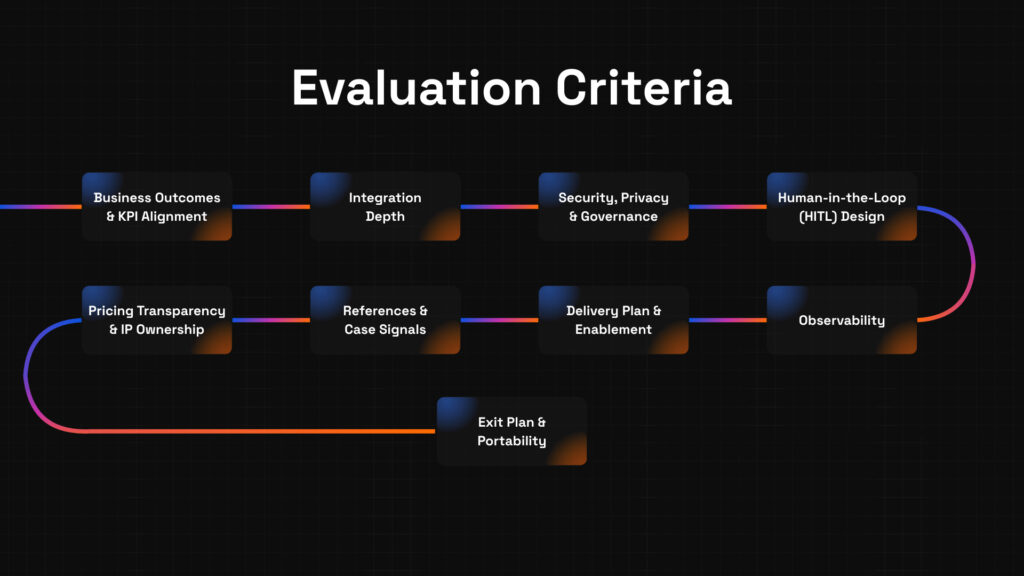
Focusing on these criteria will help you cut through vendor hype and make a confident choice for your AI chatbot for customer service. Next, we’ll cover common pitfalls to avoid and a simple five-step framework for evaluating vendors.
Common Pitfalls and a Five-Step Vendor Evaluation Framework for AI Chatbots in Customer Service
Choosing the best AI chatbot for customer service is a journey, and like any journey, there are traps along the way. This section highlights common pitfalls and offers a practical, five-step framework to keep your selection process smooth and strategic.
Common Pitfalls to Avoid
- Overpromising Features → Focus on Core Needs
Vendors often showcase every possible feature, but not all are relevant to your goals. Stick to KPIs and workflows that matter to your operation. - Ignoring Integration Complexity → Assess Early
Assuming “plug and play” leads to surprise technical debt. Evaluate integrations upfront to avoid costly delays. - Neglecting Security and Compliance → Prioritize Governance
Overlooking privacy risks can lead to serious legal and reputational damage. Confirm certifications and compliance before moving forward. - Skipping Human-in-the-Loop Design → Ensure Smooth Escalations
Fully automated chatbots can frustrate customers when issues get stuck. Confirm the system supports seamless handoffs to agents. - Lack of Observability → Demand Transparency
Without dashboards or logs, troubleshooting is guesswork. Make observability a must-have. - Opaque Pricing and Ownership Terms → Insist on Clarity
Hidden fees or unclear IP rights can lock you in. Get everything spelled out. - No Exit Plan → Plan for Portability
Be prepared to move on if needed, with chatbot assets and data intact.
Five-Step Vendor Evaluation Framework
Follow this plain-language process to pick the right AI chatbot vendor efficiently:
1. Define KPI & Scope
Example: Reduce first-contact resolution time by 20% within six months.
- Pro tip: Involve cross-functional stakeholders to agree on realistic KPIs and scope upfront.
- Why: Clear goals prevent scope creep and keep vendors accountable.
2. Shortlist with a Scorecard
Example: Create a simple spreadsheet scoring vendors on integration, security, and support.
- Pro tip: Use weighted criteria based on your priorities to rank vendors objectively.
- Stat: According to Gartner, structured scorecards improve vendor selection outcomes by 30% (Gartner, 2023).
3. Run Discovery & Access Audit
Example: Evaluate vendor’s ability to connect with your CRM, phone system, and data sources.
- Pro tip: Conduct technical deep dives early to uncover hidden blockers.
- Why: Avoid surprises that stall deployment.
4. Pilot with Human-in-the-Loop & Dashboards
Example: Launch a small pilot focusing on complex tickets that require agent handoff.
- Pro tip: Monitor performance dashboards and collect agent feedback during the pilot.
- Stat: Forrester research shows pilots with HITL reduce chatbot error rates by up to 25% (Forrester, 2024).
5. Decide, Scale, and Review Quarterly
Example: Roll out across departments with quarterly business reviews to tweak performance.
- Pro tip: Regular reviews ensure the chatbot evolves with your business needs and customer expectations.

Vendor Questions Cheat Sheet
Use these copy/paste questions during vendor conversations:
- How do you align chatbot KPIs with customer service goals?
- What systems does your chatbot integrate with out-of-the-box?
- Can you describe your security and data privacy protocols?
- How is human escalation handled in your chatbot solution?
- What observability tools are available to monitor chatbot performance?
- What does your delivery and enablement process look like?
- Can you provide references from companies with similar needs?
- How transparent is your pricing model, and what is included?
- What ownership rights do clients have over chatbot content and data?
- What is your process for supporting exit or migration?
Quick Templates for Vendor Outreach
RFP Email Template:
Hi [Vendor],
We’re evaluating AI chatbot services to improve our customer service deflection rates. Could you please share details on your integration capabilities with [CRM/tool], security certifications, and your approach to human-in-the-loop design? Looking forward to your response.
Best,
[Your Name]
Scoring Rubric Template:
| Criteria | Weight | Vendor A | Vendor B | Notes |
| KPI Alignment | 30% | 8 | 7 | Vendor A tailored KPIs |
| Integration Depth | 25% | 7 | 9 | Vendor B has deeper APIs |
| Security & Compliance | 20% | 9 | 8 | Vendor A SOC 2 certified |
| Human-in-the-Loop Design | 15% | 8 | 7 | Both support escalation |
| Observability | 10% | 7 | 6 | Vendor A has dashboards |
Final Thoughts
Choosing an AI chatbot for customer service is about balancing automation with human empathy, integration depth, and governance. Use the criteria, pitfalls, and framework outlined here to make a smart, strategic decision.
If you want help mapping out your next steps or have questions about integration readiness, consider booking a free strategy call with experts who fuse AI into the workflows that matter.