

The Power of AI Workflows: Why Integration Design Matters
AI workflows have evolved from isolated automation attempts into mission-critical business systems that define operational success in modern organizations. Teams implementing professional AI workflows are fundamentally transforming how work sequences operate, how AI integration executes, and how value creation maintains effectiveness without breaking systems, compliance, or trust. Advanced AI workflows now require complete system design from trigger definition and decision logic to AI actions and human review integration, enabling operations leaders to focus on strategic initiatives while structured workflows handle systematic value delivery that once consumed months during ad-hoc automation attempts.
The data supporting strategic workflow design continues to strengthen across operational functions. According to McKinsey research, organizations that redesign workflows alongside AI are over 3x more likely to see material ROI, demonstrating that integration design determines success as AI without workflows creates demos while AI inside workflows creates business systems requiring systematic design preventing isolated automation attempts creating disconnected tools. BCG reports that rule-based automation fails in unstructured tasks over 40 percent of the time, proving that adaptive workflows enable reliability as rigid if-then logic breaking on edge cases creates brittleness while AI workflows handling ambiguity, routing exceptions, and learning from outcomes create flexibility.
Why AI Workflows Matter for Operational Success
AI workflows extend beyond simple automation tools; they transform how operations organizations manage business systems, maintain integration discipline, and ensure value realization across all process touchpoints. Isolated automation processes that once created bottlenecks through disconnected tools, brittle rules, and broken trust can now be executed with intelligence and precision through comprehensive AI workflows that compound effectiveness over time. From achieving 3X better ROI through workflow redesign to reducing manual effort by 30-50 percent through systematic integration, strategic AI workflows deliver measurable outcomes that strengthen both operational efficiency and business value.
For operations leaders evaluating AI workflows strategies, integration design provides five critical benefits:
- Workflow Redesign Multiplies ROI: McKinsey shows that organizations redesigning workflows alongside AI are over 3X more likely to see material ROI, proving that integration design determines success as AI without workflows creates demos while AI inside workflows creates business systems, requiring systematic design addressing cycle time, throughput, error rates, and cost per action preventing isolated tools lacking operational context.
- Adaptive Logic Prevents Failures: BCG reports that rule-based automation fails in unstructured tasks over 40 percent of the time, demonstrating that flexible workflows enable reliability as rigid if-then logic breaking on edge cases creates brittleness while AI workflows handling ambiguity, routing exceptions, and learning from outcomes create adaptive capability managing variance.
- Systematic Integration Reduces Effort: PwC finds that AI-driven workflows reduce manual effort by 30 to 50 percent in ops-heavy teams, validating that comprehensive design enables efficiency as structured sequences with AI components including triggers, decision logic, AI actions, system updates, and human review liberates capacity through intelligent automation.
- Integration Planning Enables Scale: Deloitte research shows that poor integration planning is a top reason AI workflows stall after pilot, proving that connectivity architecture determines success as inadequate system design creates deployment paralysis requiring thorough planning addressing read/write access, event-based triggers, and error handling preventing scale failures.
- Security Controls Reduce Risk: Accenture reports that permission scoping reduces automation risk significantly, demonstrating that governance architecture enhances safety as systematic access controls defining boundaries, enforcing validation, and maintaining audit trails prevent unauthorized operations requiring comprehensive security design.
Understanding AI workflows is not about isolated automation; it is about establishing business systems systematically through integration design, enabling operations professionals to focus capacity on workflow redesign, systematic planning, and controlled implementation that delivers actual value rather than disconnected demos creating disappointment.

Understanding AI Workflows vs Basic Automation: Critical Distinctions
Before launching any AI workflows initiative, organizations must thoroughly understand architectural differences and capability distinctions. Simple automation differs fundamentally from AI workflows, as execution models create different characteristics. When operations teams recognize distinctions, they accelerate appropriate selection, maintain realistic expectations, and avoid expensive failures from mismatched approaches creating deployment issues.
Simple Automation Characteristics: If this, then that following predetermined paths. Rigid rules lacking flexibility. Breaks on edge cases encountering failure when conditions unexpected as deterministic logic works for predictable scenarios but creates brittleness with variance.
AI Workflow Characteristics: Handle ambiguity interpreting unclear situations. Route exceptions managing non-standard cases. Learn from outcomes adapting based on feedback as adaptive capability enables flexible response as BCG shows that rule-based automation fails in unstructured tasks over 40 percent of the time requiring intelligent workflows.
Pro Tip: Simple automation uses if-then logic and rigid rules that break on edge cases. AI workflows handle ambiguity, route exceptions, and learn from outcomes as BCG shows rule-based automation failing over 40 percent in unstructured tasks requiring adaptive intelligence.
Understanding AI Workflows KPIs: What to Measure
Before launching any AI workflows initiative, organizations must thoroughly define success metrics that enable objective evaluation and ongoing performance monitoring. Key performance indicators provide the measurement framework that distinguishes valuable implementations from expensive failures creating operations team skepticism. When operations teams establish KPIs in advance, they align stakeholders around clear targets, enable data-driven optimization, and build business cases that justify continued investment through demonstrated value.
- ROI Achievement Rate: Track the percent of workflow redesigns delivering material returns to measure integration effectiveness, targeting improvement as McKinsey shows that organizations redesigning workflows alongside AI are over 3X more likely to see material ROI requiring systematic design creating business systems.
- Automation Success Rate: Calculate the percent of workflows operating reliably to measure adaptive capability, minimizing failures as BCG reports that rule-based automation fails over 40 percent in unstructured tasks requiring AI workflows handling ambiguity and routing exceptions preventing brittleness.
- Manual Effort Reduction: Monitor capacity liberation to measure efficiency gains when systematic integration reduces work, targeting improvements like 30-50 percent as PwC shows AI-driven workflows reducing manual effort in ops-heavy teams through intelligent automation.
- Cycle Time Improvement: Track duration decrease to measure velocity enhancement when workflow optimization accelerates execution, quantifying gains as faster throughput demonstrates value through reduced time from trigger to completion.
- Error Rate Reduction: Calculate mistake decrease to measure quality improvement when systematic validation prevents failures, minimizing problems as reduced errors demonstrate value through fewer corrections and escalations.
- Cost Per Action: Evaluate unit economics to measure financial efficiency when total workflow expenses divided by completed actions, understanding profitability as comprehensive cost tracking demonstrates sustainable operations.
- Escalation Appropriateness: Monitor human handoff quality to measure routing effectiveness when exceptions directed appropriately, ensuring balance as excessive escalation indicates insufficient automation while minimal escalation suggests inadequate oversight.
- Integration Completeness: Track system connectivity to measure architecture quality when comprehensive access enables full workflow execution, ensuring viability as Deloitte shows that poor integration planning causes stalls requiring thorough connectivity.
Pro Tip: Avoid cross-team dependencies early building confidence through focused workflows. Ask how workflows fail safely understanding error handling as recovery procedures determine reliability when issues arise requiring systematic failure management.
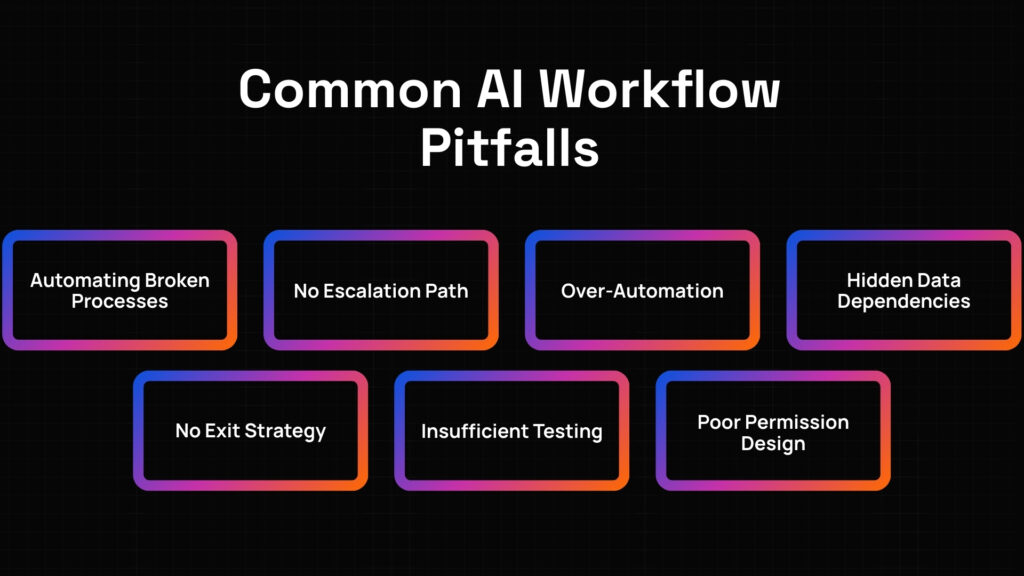
Common AI Workflow Pitfalls
AI workflows promise efficiency and better execution, but poor design and inadequate integration can create expensive failures instead of business systems. Many operations organizations make avoidable mistakes during implementation that delay value realization and erode both operational trust and executive confidence. To discover proven methodologies tailored for your workflow design and integration requirements, explore our AI Workflow Automation Services page for detailed AI workflows frameworks and real-world implementation guidance.
- Automating Broken Processes: Implementing AI on inefficient workflows amplifies problems. Fix the workflow first optimizing process design, as automating broken sequences creates faster failures rather than improved operations requiring process optimization before AI integration ensuring sound foundation.
- No Escalation Path: Operating without human oversight creates quality risk. Add human checkpoints incorporating review where complexity requires judgment, as systematic escalation maintains standards while preventing autonomous errors in ambiguous situations requiring contextual interpretation beyond AI capability.
- Over-Automation: Attempting complete autonomy immediately creates trust issues. Start with assistive AI providing recommendations requiring human approval, as gradual capability expansion builds confidence through demonstrated reliability preventing resistance from excessive autonomy undermining adoption.
- Hidden Data Dependencies: Proceeding without connectivity assessment creates surprise failures. Audit systems early validating data access and information flow, as systematic discovery identifies integration requirements preventing expensive surprises from unanticipated dependencies discovered during implementation.
- No Exit Strategy: Accepting vendor control creates dependency. Own workflow logic through explicit contractual terms, as intellectual property clarity enables operational independence preventing vendor lock-in when relationships change or requirements evolve requiring migration capability.
- Set-and-Forget Mentality: Treating workflows as one-time implementation creates performance degradation. Retire workflows that stop paying back as operational conditions change requiring ongoing assessment ensuring automation continues delivering value justifying operational expenses.
- Insufficient Testing: Deploying without validation creates production issues. Validate in production running pilots with real data and actual users, as controlled testing proves capability before scaling preventing expensive failures from inadequate validation attempting comprehensive deployment prematurely.
- Poor Permission Design: Granting excessive access creates security risk. Implement least privilege first starting with minimal permissions, as systematic permission progression validates behavior safely before expanding access preventing unauthorized operations from over-permissioned automation.
The Impact of Integration Readiness
Before launching any AI workflows initiative, organizations must thoroughly assess their system architecture, data accessibility, and workflow maturity. Integration readiness evaluates how well existing operational systems, information assets, and process designs can support AI workflows without creating technical debt or execution gaps. When operations teams conduct integration audits in advance, they uncover system limitations and workflow issues early, align stakeholders around integration requirements, and minimize wasted time during design and deployment phases.
Example: A software company preparing for AI workflows mapped their integration readiness and system preparedness, discovering they were automating broken processes requiring workflow fixes first, had no escalation path requiring human checkpoint addition, had over-automation risks requiring assistive AI start, had hidden data dependencies requiring early system audits, and had no exit strategy requiring workflow logic ownership. Addressing these integration readiness issues before implementation engagement reduced the overall deployment timeline by seven weeks.
Pro Tip: Map systems and permissions understanding connectivity comprehensively. Use least privilege first validating safely with minimal access before expanding permissions. Apply CRM read-write with email send-only demonstrating granular controls as Accenture shows permission scoping reducing risk significantly through systematic boundaries.
Evaluating AI Workflows ROI
Quantifying the benefits of AI workflows helps secure executive buy-in and refine future investments in automation technology. Measuring ROI goes beyond simple time savings; it captures improvements in workflow redesign impact, automation reliability, effort reduction, and operational efficiency. Without clear financial modeling during evaluation, AI workflows projects risk becoming expensive implementations that fail to justify ongoing operational expenses and system maintenance costs.
Key considerations for financial analysis include:
- Workflow Redesign Impact: Track ROI multiplication when integration design targets material returns, calculating value as McKinsey shows that organizations redesigning workflows alongside AI are over 3X more likely to see material ROI requiring systematic design creating business systems not isolated automation attempts.
- Automation Reliability Enhancement: Monitor success rate improvement when adaptive workflows prevent failures, quantifying gains as BCG reports that rule-based automation fails over 40 percent in unstructured tasks while AI workflows handling ambiguity and routing exceptions create reliability through flexibility.
- Manual Effort Reduction Value: Calculate capacity liberation when systematic integration targets efficiency, measuring gains as PwC finds that AI-driven workflows reduce manual effort by 30 to 50 percent in ops-heavy teams through intelligent automation liberating staff for higher-value work.
- Integration Success Impact: Track deployment achievement when thorough planning prevents stalls, quantifying success as Deloitte shows that poor integration planning causes failures requiring comprehensive connectivity architecture addressing read/write access, event triggers, and error handling enabling scale.
- Security Enhancement Value: Monitor incident reduction when permission controls prevent violations, calculating safety as Accenture reports that permission scoping reduces automation risk significantly through systematic boundaries preventing unauthorized operations creating compliance issues.
- Total Cost of Ownership: Include design fees, integration development costs, system connectivity expenses, plus ongoing maintenance fees, monitoring costs, and governance overhead in comprehensive analysis. Understand that workflow design requires realistic cost modeling accounting for complete system architecture beyond simple tool licensing.
McKinsey shows that organizations redesigning workflows alongside AI are over 3X more likely to see material ROI. BCG reports that rule-based automation fails in unstructured tasks over 40 percent of the time. PwC finds that AI-driven workflows reduce manual effort by 30 to 50 percent in ops-heavy teams. Deloitte research shows that poor integration planning is a top reason AI workflows stall after pilot. Accenture reports that permission scoping reduces automation risk significantly. When every AI workflows implementation includes comprehensive system design with triggers, decision logic, AI actions, system updates, and human review integration, every deployment follows thorough integration planning addressing connectivity, permissions, and error handling.
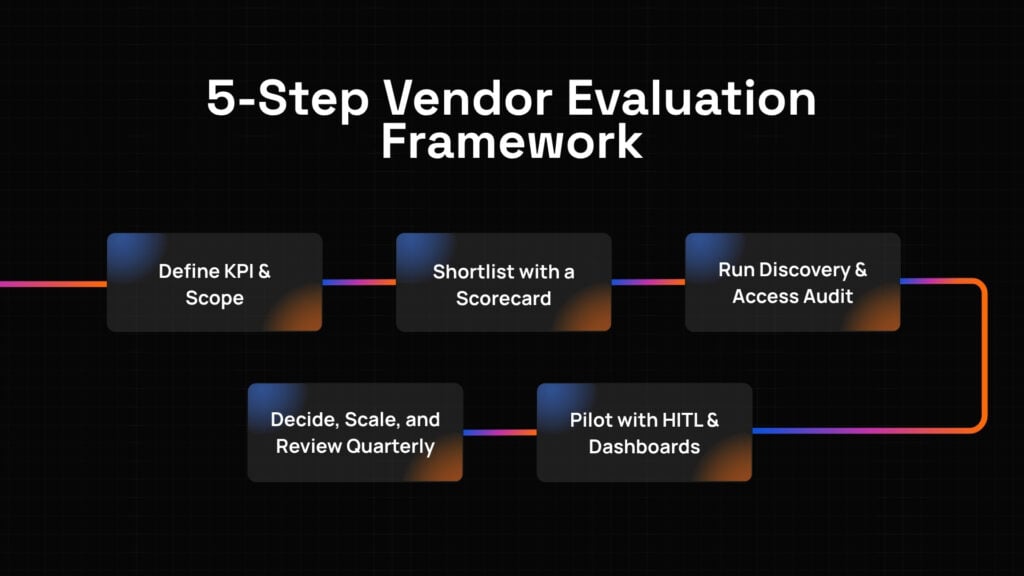
5-Step Framework for Building AI Workflows
Implementing AI workflows should follow a disciplined, structured process that aligns with your organization’s operational goals while accounting for both integration requirements and system architecture needs. Instead of focusing solely on impressive AI demonstrations or isolated automation promises, implementation should weigh how well the AI workflows solution supports measurable outcomes, integrates with existing systems, and enables operational value through appropriate design.
1. Define KPI & Scope
Start by identifying specific measurable outcomes with narrow scope that enables quick value proof. Remember to choose one workflow avoiding cross-functional complexity, as focused implementation proves workflow value. Defining concrete targets helps align all stakeholders including operations leadership, process owners, IT infrastructure, and governance teams. Your goal might be reducing average handle time by 15 percent, improving processing accuracy, or accelerating approval cycles, but it must be quantifiable with clear operational impact.
Example: A technology company defined its KPI as “reducing average handle time by 15 percent within 90 days while maintaining quality standards above 95 percent and achieving 3X ROI through workflow redesign.” This metric guided every workflow discussion, shaped integration design with clear system requirements, and became the success measurement. They avoided cross-team dependencies early maintaining focused scope.
Pro Tip: Document one primary operational outcome before requesting proposals. Choose one workflow like support ticket resolution or lead qualification to enable clear attribution, and define specific percentage improvement targets with timelines that enable objective go/no-go decisions during workflow evaluation, as concrete goals prevent scope expansion from ambitious transformation attempts.
2. Shortlist Vendors with Scorecard
Once objectives are clear, move to structured vendor comparison emphasizing delivery capability over presentations. Remember to compare on delivery, not slides, as execution ability determines success. This evaluation allows teams to quantify how well each vendor supports successful workflows including asking how workflows fail safely to understand error handling, production references, integration depth, and proven methodology.
Example: One enterprise prioritized vendors demonstrating workflow expertise including comparing on delivery, not slides to assess capability, asking how workflows fail safely to understand recovery procedures, reviewing integration architectures to evaluate connectivity, and noting that demos without data access do not count requiring actual system integration validation not theoretical presentations.
Pro Tip: Turn evaluation criteria into delivery validation so workflow decisions remain defendable beyond impressive demonstrations. Compare on delivery, not slides, requiring proven track records. Ask how workflows fail safely including error detection, rollback procedures, and impact mitigation. Remember that demos without data access do not count as real integration requires actual system connectivity not simulated presentations.
3. Discovery & Access Audit
Before contracts are signed, a structured discovery phase maps systems and permissions, documenting every integration touchpoint and workflow requirement. During this phase, teams validate system connectivity, surface data dependencies, and confirm security capabilities with appropriate controls. Start with least privilege first to validate approach safely.
Example: A financial services company conducted discovery for AI workflows, revealing that their systems required comprehensive mapping including CRM read-write for data management, email send-only for communication demonstrating granular controls, their workflows had hidden data dependencies requiring early audits, their security needed permission scoping before automation access, and their integration demanded thorough connectivity planning for successful deployment requiring preparation before implementation.
Pro Tip: Ensure the vendor provides workflow architecture diagrams before proposals to validate approach. Map systems and permissions including CRM, support platforms, and communication tools comprehensively. Use least privilege first starting with minimal access like CRM read-write and email send-only, as Accenture shows that permission scoping reduces automation risk significantly through controlled validation.
4. Pilot with HITL & Dashboards
A well-designed pilot validates both workflow performance and business value under real operational conditions. Remember to validate in production with actual data and real users. Instead of full deployment immediately, run with human review to maintain quality assurance while proving workflow capability. Incorporating comprehensive measurement ensures that pilot demonstrates returns building investment confidence.
Example: A retail company piloted AI workflows with comprehensive oversight, validating in production by reviewing first 100 AI actions to assess quality and outcomes. They tracked cost per outcome measuring unit economics demonstrating financial viability, achieving 14 percent handle time reduction approaching 15 percent target with positive ROI trajectory. Human oversight maintained quality during validation phase.
Pro Tip: Execute pilots reviewing first 100 AI actions validating quality through human oversight, establishing clear success criteria including financial benchmarks, and tracking measurable KPIs weekly. Validate in production with real data and actual users proving capability under operational conditions. Track cost per outcome measuring unit economics. Use pilot to refine workflow design before comprehensive deployment as controlled testing builds confidence.
5. Decide, Scale, & Review Quarterly
After the pilot proves both operational value and positive ROI, use findings to guide the final decision about controlled expansion, validating sustainability. Remember to scale proven workflows only after validation demonstrates returns. Scaling should be deliberate, expanding one workflow at a time after previous implementations demonstrate sustained value. Continuous quarterly reviews maintain workflow discipline, ensuring automation continues delivering returns justifying operational expenses.
Example: A technology company conducted quarterly reviews with its AI workflows partner, scaling proven workflows only after validation over 12 months. They expanded one workflow at a time after value proof, identified optimization opportunities improving handle time by additional 8 percent, and retired workflows that stopped paying back when operational conditions changed eliminating implementations no longer delivering value.
Pro Tip: Treat vendor reviews as workflow governance sessions focused on value delivery and business impact, not just performance metrics. Scale proven workflows only expanding after validation demonstrates sustained returns. Expand one workflow at a time proving capability before comprehensive deployment. Retire workflows that stop paying back as operational conditions change requiring ongoing assessment ensuring continued value justifying expenses.
Next Steps in Your AI Workflows Evaluation
By now, you should have a clear understanding of what to prioritize when implementing AI workflows. Bringing these insights together creates a structured evaluation flow that de-risks investment and accelerates value realization while ensuring integration quality and operational effectiveness.
- Align with operational metrics: Ensure that every workflow component connects to specific KPIs like handle time, throughput, or error rates tied to operational impact, not just automation sophistication that is disconnected from actual business outcomes and measurable efficiency results.
- Evaluate comprehensive design: Confirm that AI workflows include triggers initiating execution, decision logic determining paths, AI actions executing intelligence, system updates maintaining state, and human review ensuring quality, as all five components must exist for complete business systems not isolated automation tools.
- Focus on workflow redesign: Prioritize systematic integration as McKinsey shows that organizations redesigning workflows alongside AI are over 3X more likely to see material ROI, requiring comprehensive design creating business systems addressing cycle time, throughput, error rates, and cost per action.
- Review integration planning: Favor partners with thorough connectivity architecture as Deloitte shows that poor integration planning causes stalls, requiring comprehensive design addressing read/write access, event-based triggers, and error handling enabling scale preventing deployment paralysis from inadequate system design.
- Test with real conditions: Always run pilots validating in production with actual data and real users, frozen scope on specific workflows enabling clear attribution, least privilege permissions validating safely, and comprehensive measurement before scaling to validate workflow effectiveness, business value, and operational readiness under real-world conditions with actual complexity.
With these criteria in place, you are better equipped to identify AI workflows solutions that not only automate tasks but also create business systems, deliver measurable ROI, maintain integration quality, and amplify your team’s capacity to focus on strategic planning that requires workflow expertise that isolated automation cannot capture.
Vendor Questions to Copy and Paste
To make the most informed decision during your AI workflows evaluation, be sure to ask these essential questions:
- How do you design AI workflows, not just automations, including trigger definition, decision logic, AI action integration, system updates, and human review coordination that create complete business systems?
- What happens when the AI is uncertain, including escalation procedures, confidence thresholds, and fallback mechanisms that maintain quality when situations require human judgment?
- How are failures logged and reversed, including error detection, rollback procedures, and impact mitigation that enable recovery when workflows encounter issues?
- Who owns the workflow logic, ensuring operational independence at engagement end, including intellectual property rights and design control that prevent vendor lock-in?
- How do we exit cleanly, enabling portability without starting over or losing workflow designs, system integrations, and operational knowledge?
- Can you provide two customer references in similar industries who can discuss workflow effectiveness, integration quality, business value delivery, and ongoing partnership quality?
- What integration effort is required, including system connectivity work, permission configuration, and error handling implementation that represent true deployment complexity?
- How do you handle edge cases, including exception routing, ambiguity management, and learning mechanisms that create adaptive workflows not brittle automation?
- What monitoring infrastructure exists, including logs and traces capturing workflow execution, dashboards tracking performance, and observability enabling troubleshooting?
- How do workflows evolve, including update procedures, optimization processes, and retirement decisions that maintain value delivery as operational conditions change?
Transform Operations with Strategic AI Workflows
AI workflows are not isolated automation; they are strategic business systems that require careful integration design, comprehensive connectivity planning, and continuous value assessment. The right approach brings 3X better ROI through workflow redesign, 30-50% manual effort reduction through systematic integration, and maintained reliability through adaptive logic, while poor implementation creates disconnected tools and brittle automation that undermine trust and waste investment.
Ready to transform your operations with strategic AI workflows? Book a Free Strategy Call with us to explore the next steps and discover how we can help you design workflows, plan integration, and deploy the right AI workflows solution for your unique operational environment, system architecture, business objectives, and measurable outcome goals.